
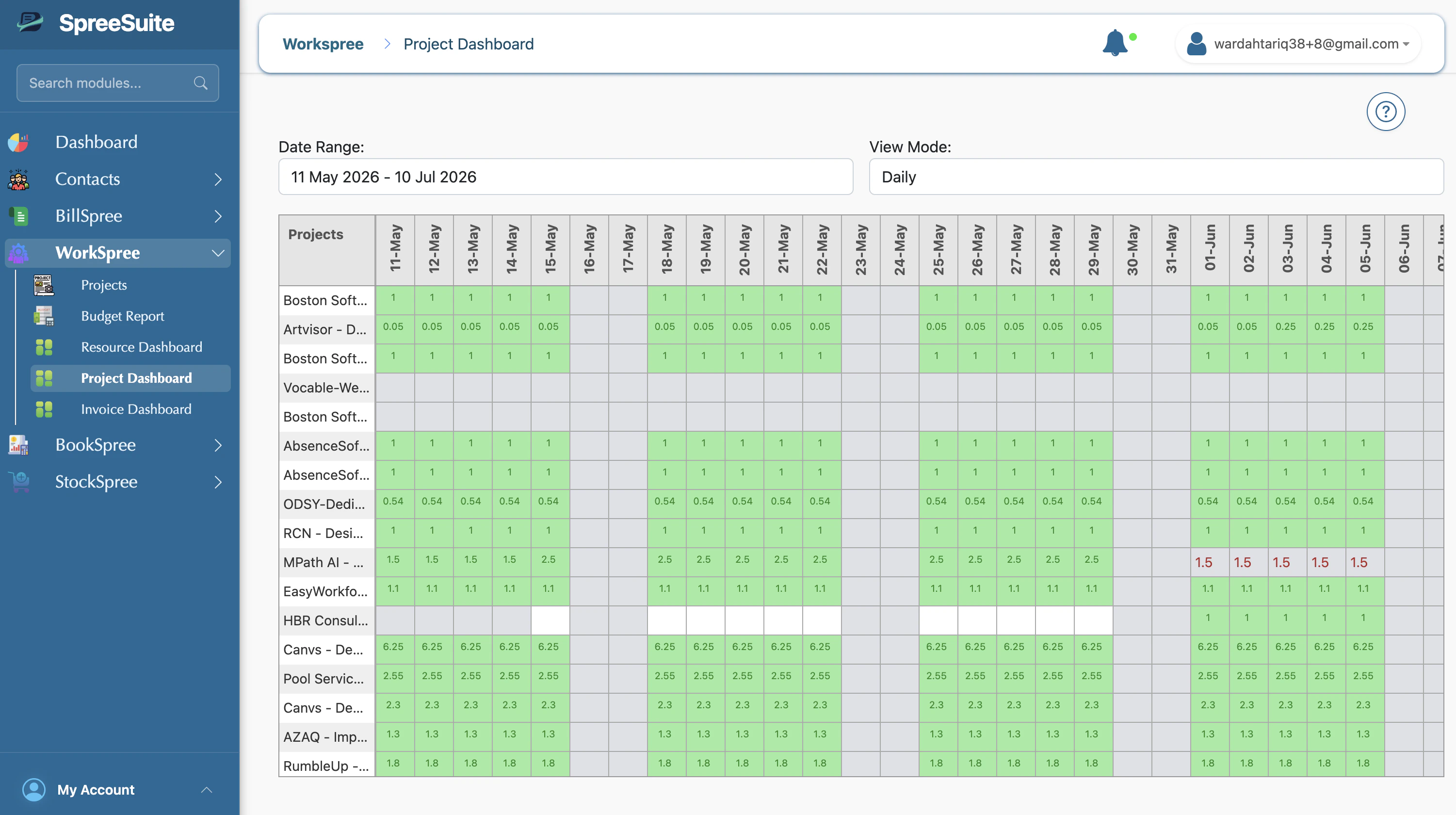
Dashboard Layout
- Rows: Represent individual projects.
- Columns: Represent the time axis, which can be viewed in Daily, Weekly, or Monthly modes.
- Cells: Represent the total allocated effort (e.g., total hours or person-count) for that project during the selected period.
Visual Highlights
Similar to the Resource Dashboard, color-coding is used for quick scanning:- Green Cells: Represent periods with active work or resource allocation.
- White Cells: Represent periods with no scheduled work.
- Weekend Marking: Clear visual distinction for non-working days.
Usage Scenarios
- Deadline Planning: Identify when projects are entering high-intensity phases to ensure deadlines are realistic.
- Resource Leveling: See which projects are “heavy” in a specific month and adjust allocations to prevent team burnout.
- Portfolio Overview: Get a bird’s-eye view of all ongoing work without diving into individual task details.