> ## Documentation Index
> Fetch the complete documentation index at: https://docs.techfootintl.com/llms.txt
> Use this file to discover all available pages before exploring further.
# Security Attributes
The platform implements a centralized **Attribute-Based Access Control (ABAC)** framework using **Security Attributes** to control visibility and access across pricing, subscription, customer, and operational entities.
Security Attributes provide fine-grained authorization by evaluating whether a user’s assigned attributes match the security configuration of a resource.
This enables secure and scalable access control across enterprise environments without relying solely on static role-based permissions.
Security filtering can be applied across:
* rate lists
* charge rules
* plans
* base plans
* add-ons
* customers
* Employee
### Purpose of Security Attributes
Security Attributes are designed to provide:
* multi-dimensional access control
* tenant-level data isolation
* region-based visibility restrictions
* controlled pricing visibility
* secure subscription access
* enterprise-grade authorization governance
The framework ensures users can only access resources aligned with their assigned business dimensions.
## Core Security Model
The ABAC framework evaluates access using two primary components:
| Component | Description |
| :------------------ | :----------------------------------------- |
| Subject Attributes | Attributes assigned to authenticated users |
| Resource Attributes | Attributes assigned to entities/resources |
Access is granted only when the subject’s attributes satisfy the resource’s security requirements.
### Security Matching Logic
The ABAC engine evaluates access using multi-dimensional attribute matching.
#### OR Logic Within a Dimension
If multiple values exist inside the same dimension, any overlapping value grants eligibility for that dimension.
Example
```text theme={null}
region = north OR east
```
If the user belongs to either `north` or `east`, the dimension passes validation.
#### AND Logic Across Dimensions
All configured dimensions must match simultaneously for access to be granted.
Example
```text theme={null}
region match
AND
department match
AND
tier match
```
Failure in any dimension results in access denial.
#### Authorization Evaluation Example
#### User Attributes
#### Resource Attributes
```text theme={null}
region = north,south
department=sales
```
#### Authorization Result
> Access Granted
Because:
* region overlaps (`north`)
* department overlaps (`sales`)
#### Administrative Access
Administrative users bypass Security Attribute filtering entirely.
Administrative access provides unrestricted visibility across.
## **Create Security Attributes**
1. Click on My Account
2. Click on My Team
3. Click on the Security Attributes tab
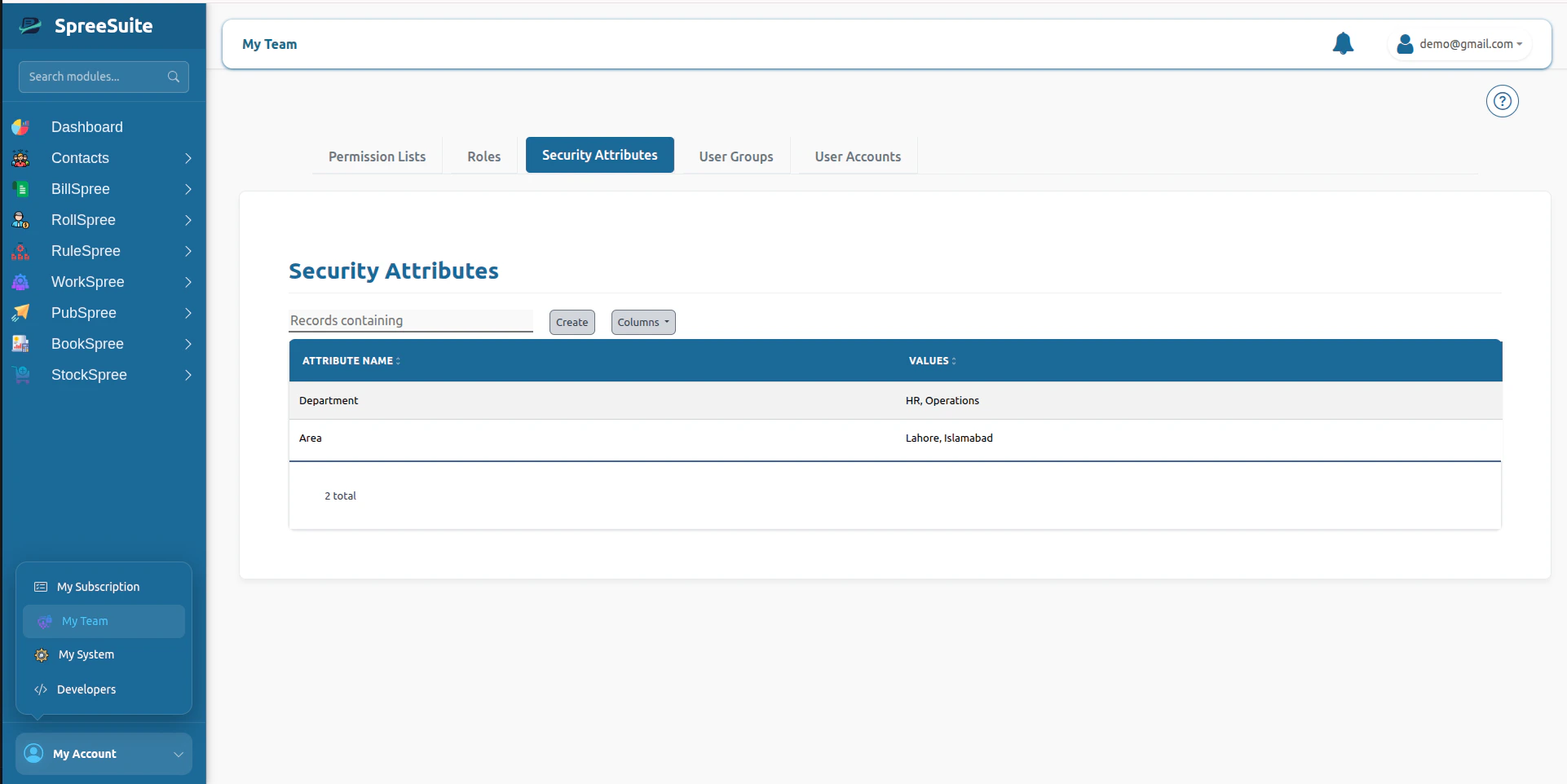 4. Click on the Create button
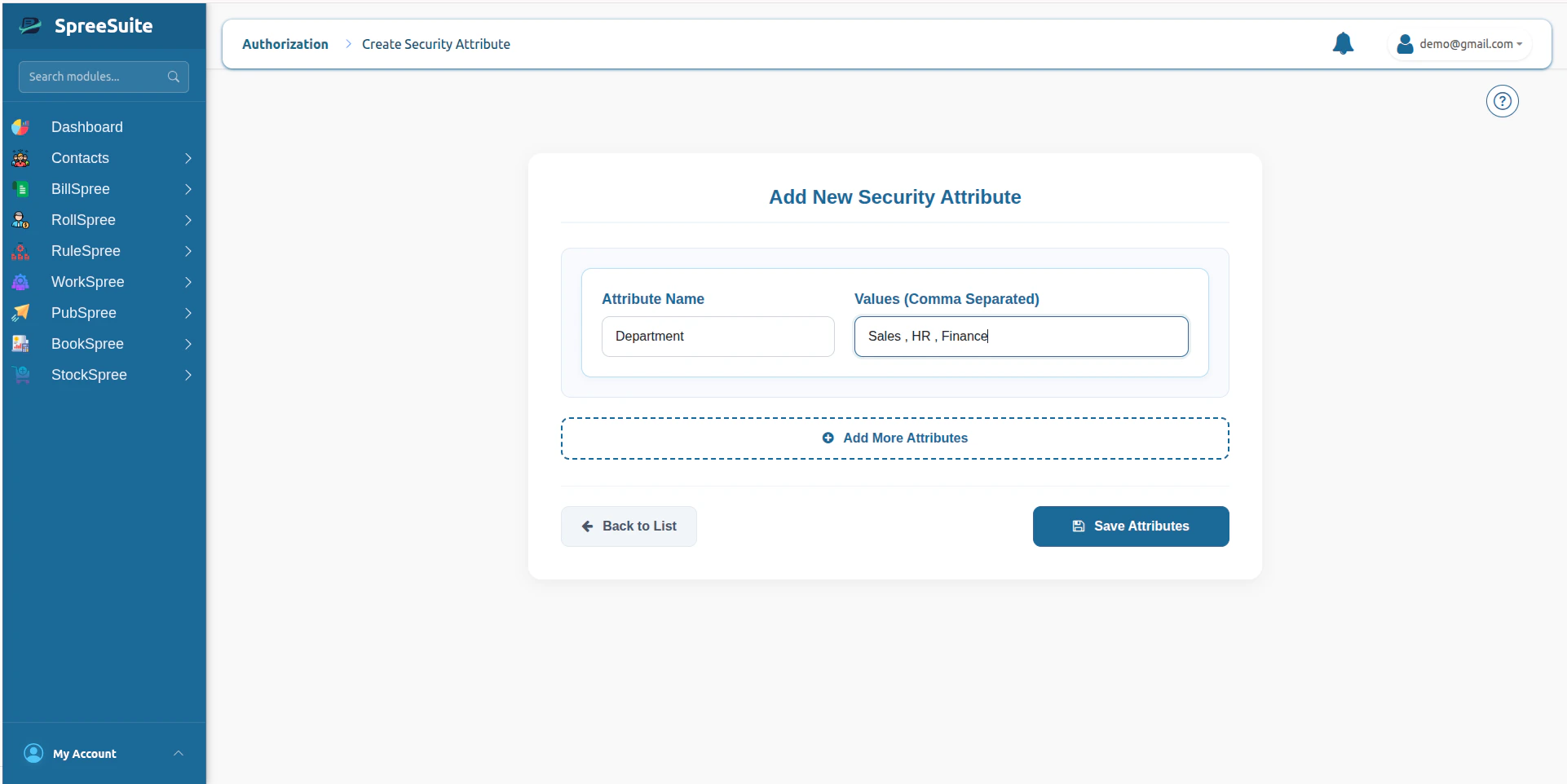
5. Add name and values of attributes
6. click save button to save attributes
4. Click on the Create button
5. Add name and values of attributes
6. click save button to save attributes
 ## Summary
The Roles Module is the central access-profile management system within the platform’s IAM architecture, enabling scalable RBAC by aggregating Permission Lists into reusable authorization profiles for Users and User Groups.
## Summary
The Roles Module is the central access-profile management system within the platform’s IAM architecture, enabling scalable RBAC by aggregating Permission Lists into reusable authorization profiles for Users and User Groups.