> ## Documentation Index
> Fetch the complete documentation index at: https://docs.techfootintl.com/llms.txt
> Use this file to discover all available pages before exploring further.
# Usage Estimation
## Overview
During the billing process, there are situations where actual meter readings are not available for all customers.
This can happen for various reasons:
* Meter reading was not submitted.
* Field staff could not access the property.
* Smart meter communication failed.
* Data upload was incomplete.
* A reading was missed during the billing cycle.
Without a current meter reading, the system cannot accurately calculate consumption, which prevents billing from proceeding.
The **Estimate Missing Meter Readings** process automatically fills these gaps by using historical consumption data and predefined estimation rules configured for each metered service parameter.
This ensures that billing can continue even when actual readings are unavailable.
## Why Estimation Is Needed
For metered services, bill calculations depend on consumption.
Consumption is typically calculated as:
```text theme={null}
Consumption = Current Reading - Previous Reading
```
If the current reading is missing, consumption cannot be calculated.
Example:
| Previous Reading | Current Reading |
| :--------------- | :-------------- |
| 12,500 | Missing |
Since the current reading is unavailable, the system estimates usage using historical billing information and generates an estimated reading.
## How Estimation Works
The estimation process identifies customers who are missing current readings and calculates estimated usage based on previous billing history.
The system then:
1. Calculates estimated consumption units.
2. Derives an estimated current reading.
3. Marks the reading as estimated.
4. Makes the record available for bill processing.
# Example
Suppose a customer has the following history:
| Month | Usage |
| :------- | :-------- |
| January | 450 Units |
| February | 500 Units |
| March | 550 Units |
| April | Missing |
The system can use historical usage patterns to estimate April's consumption.
For example:
```text theme={null}
Estimated Usage = Average of Historical Usage
(450 + 500 + 550) ÷ 3
= 500 Units
```
The estimated usage is then used to calculate an estimated current reading.
## What Gets Updated?
When estimation is performed, the billing system updates:
### Estimated Consumption
The calculated usage units for the billing period.
Example:
| Usage |
| :-------- |
| 500 Units |
### Estimated Current Reading
A new current reading is derived from:
```text theme={null}
Previous Reading + Estimated Usage
```
Example:
| Previous Reading | Estimated Usage | Estimated Reading |
| :--------------- | :-------------- | :---------------- |
| 12,500 | 500 | 13,000 |
### Estimation Flag
The system marks the reading as estimated rather than actual.
This provides visibility during audits and billing reviews.
## Supported Estimation Methods
Each metered service parameter can be configured with a specific estimation method.
Examples of metered parameters include:
* KWH
* M3 Gas
* Water Consumption
* Utility Usage
The estimation method is configured when the service or package is created.
## Estimation Method 1: Average of Last Year
The system calculates the average consumption from the previous calendar year.
### Example
| Month | Usage |
| :---- | :---- |
| Jan | 450 |
| Feb | 500 |
| Mar | 550 |
| ... | ... |
| Dec | 600 |
Average:
```text theme={null}
Total Usage ÷ 12
```
The calculated average becomes the estimated consumption.
### Best For
Customers with relatively stable consumption patterns.
## Estimation Method 2: Same Month Last Year
The system uses consumption from the same month in the previous year.
### Example
Current Billing Period:
```text theme={null}
January 2025
```
Historical Reference:
```text theme={null}
January 2024
```
| Month | Usage |
| :----------- | :-------- |
| January 2024 | 700 Units |
Estimated Usage:
```text theme={null}
700 Units
```
### Best For
Seasonal services where consumption varies throughout the year.
Examples:
* Electricity
* Gas
* Water
## Estimation Method 3: Greater of Average and Same Month
The system calculates:
* Average of Last Year
* Same Month Last Year
It then selects whichever value is greater.
### Example
| Calculation | Result |
| :------------------- | :-------- |
| Average Last Year | 450 Units |
| Same Month Last Year | 600 Units |
Estimated Usage:
```text theme={null}
600 Units
```
### Best For
Conservative billing approaches where underestimation should be avoided.
## Estimation Method 4: Maximum Usage of Last Year
The system uses the highest recorded consumption from the previous calendar year.
### Example
| Month | Usage |
| :------- | :---- |
| January | 450 |
| February | 500 |
| July | 900 |
| December | 650 |
Maximum Usage:
```text theme={null}
900 Units
```
Estimated Usage:
```text theme={null}
900 Units
```
### Best For
Organizations that prefer high-confidence recovery of potential revenue.
## Estimation Method 5: Minimum Usage of Last Year
The system uses the lowest recorded consumption from the previous calendar year.
### Example
| Month | Usage |
| :------- | :---- |
| January | 450 |
| February | 500 |
| March | 320 |
| April | 600 |
Minimum Usage:
```text theme={null}
320 Units
```
Estimated Usage:
```text theme={null}
320 Units
```
### Best For
Conservative customer-friendly estimation strategies.
# Example Billing Scenario
Consider the following customer:
### Meter Information
| Item | Value |
| :---------------- | :------------------- |
| Previous Reading | 15,000 |
| Current Reading | Missing |
| Estimation Method | Average of Last Year |
### Historical Usage
| Month | Usage |
| :---- | :---- |
| Jan | 500 |
| Feb | 550 |
| Mar | 450 |
| Apr | 500 |
Average Usage:
```text theme={null}
500 Units
```
The system calculates:
| Item | Value |
| :---------------- | :----- |
| Estimated Usage | 500 |
| Estimated Reading | 15,500 |
| Estimated Flag | Yes |
Billing can now proceed normally.
## How to Estimate All:\\
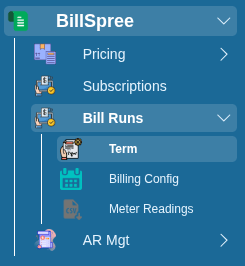
1-Go to **BillSpree** **→Bill Runs →Term**
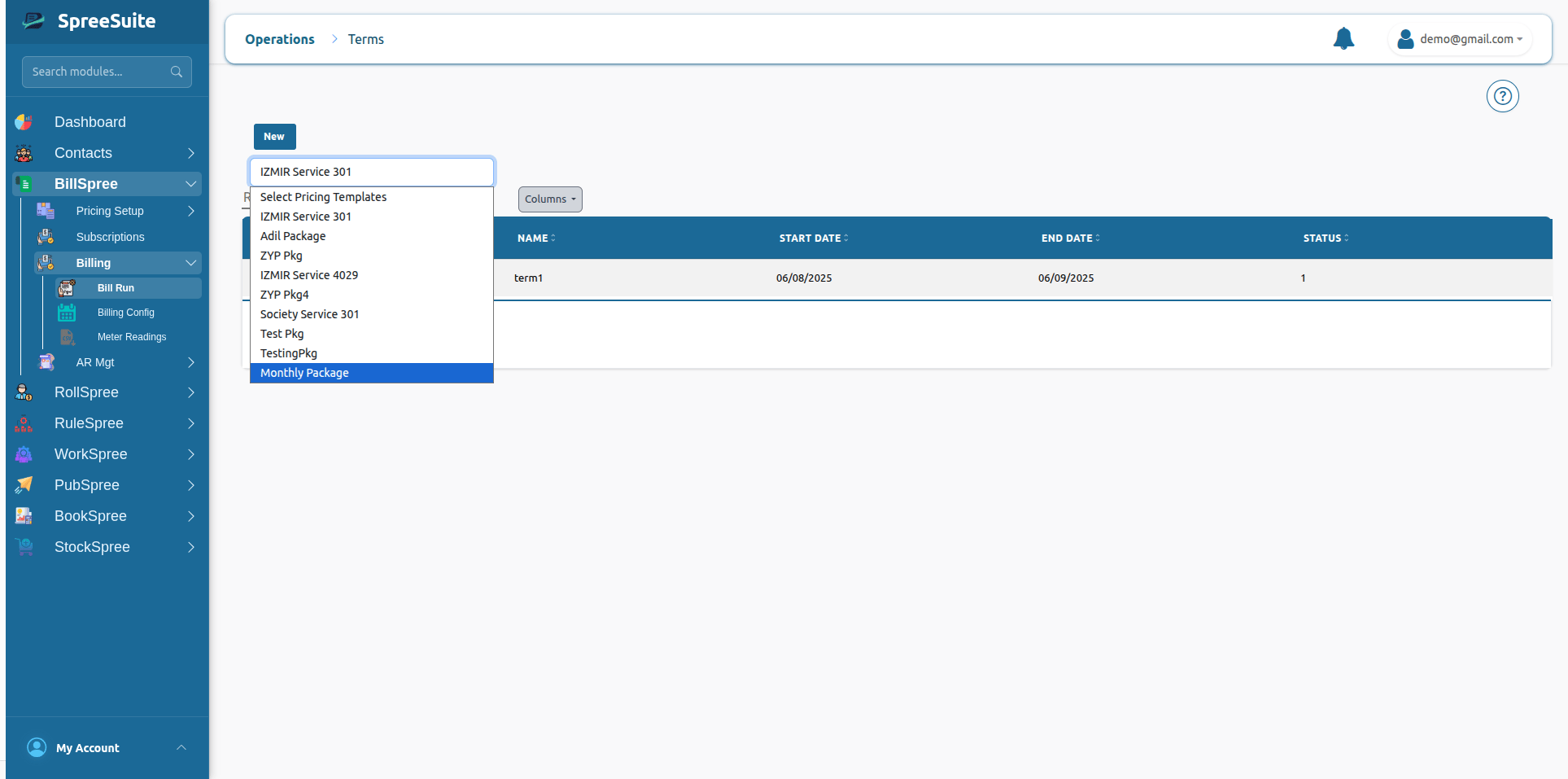
 2-Select **Pricing template** of Term:
 # Unmetered Services
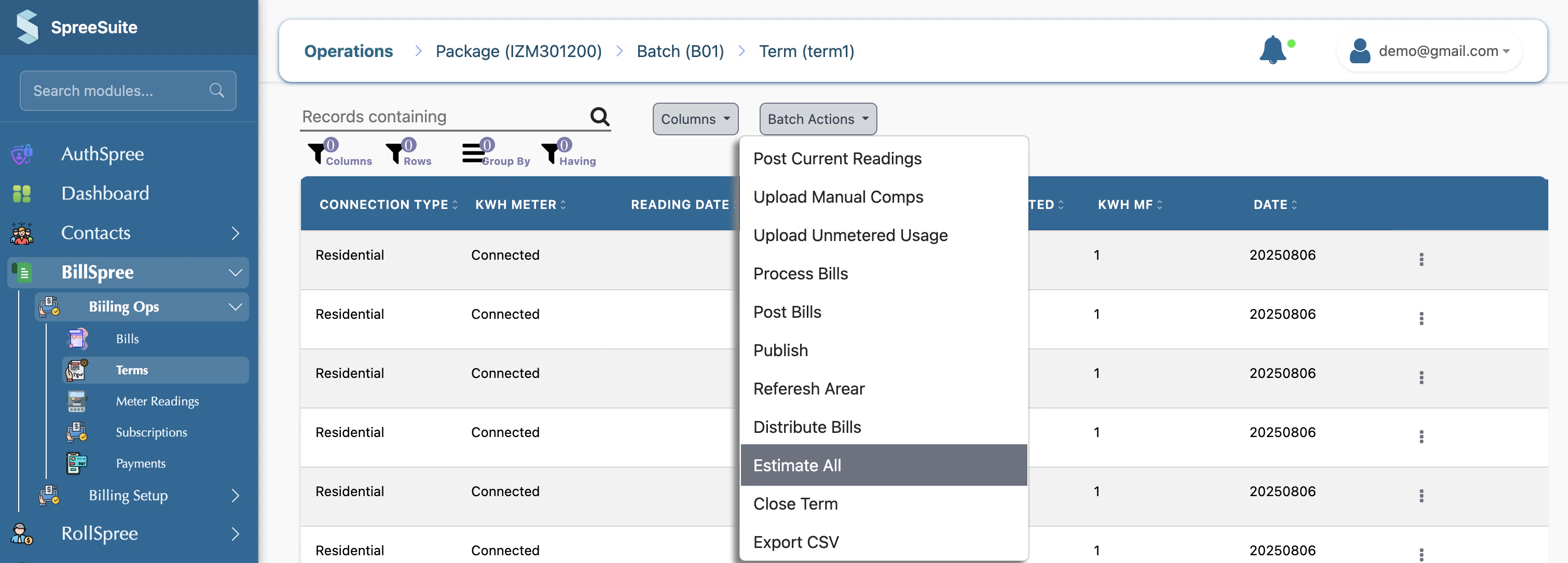
3-Click on **Batch Action** and Select **Estimate All**.
# Unmetered Services
3-Click on **Batch Action** and Select **Estimate All**.
 ## Summary
Estimate Missing Meter Readings automatically fills gaps in meter data using historical consumption patterns, ensuring that billing can continue even when actual readings are unavailable.
## Summary
Estimate Missing Meter Readings automatically fills gaps in meter data using historical consumption patterns, ensuring that billing can continue even when actual readings are unavailable.