> ## Documentation Index
> Fetch the complete documentation index at: https://docs.techfootintl.com/llms.txt
> Use this file to discover all available pages before exploring further.
# Pricing Module
A **Pricing Module** lives inside a Pricing Template and supplies the actual prices, calculation rules, and billing logic. Where the template defines *what components exist*, a pricing module defines *what those components do*.
## Pricing Module Fields
Every Pricing Module has the following fields:
| Field | Description |
| :------------------------ | :----------------------------------------------------------------------------------------------------------------------------------------------------------------------------------------------------------------------------------------------------------------------------------------------------------------------------------------------------------------------------------------------------- |
| **Name** | Unique within the Pricing Template. |
| **Code** | Unique within the Pricing Template. |
| **Label** | Unique across *all* Pricing Modules, regardless of template. Users browse and select Pricing Modules without necessarily filtering by template, so two modules with the same Name in different templates would be indistinguishable on screen. Label is the identifier shown to avoid that confusion. |
| **Description** | Free-text description. |
| **Pricing Module Type** | **Base Pricing Module** or **Add-On Pricing Module**—determines whether a subscription created from this module is a base subscription or an add-on subscription. An Add-On attaches to a Base subscription; Add-Ons cannot have other Add-Ons nested inside them. Only meaningful when Plan is marked—if no subscription can ever be created from a module, there's nothing for this field to decide. |
| **Visibility** | **Public** (visible on the customer portal) or **Private** (not visible on the customer portal). |
| **Plan check** | If marked, a subscription can be created from this module—by the customer self-subscribing, or by an admin creating it on their behalf. If unmarked, **no one can ever create a subscription from it**, not even an admin; it exists purely as a building block other modules inherit from. |
| **Custom check** | Only meaningful when Plan is marked. If marked, the customer sees a "Contact Us" prompt instead of a direct subscribe button—only an admin can actually create the subscription for them. If unmarked, the customer can subscribe directly themselves. |
| **Billing Timing** | **Prepaid** (billed upfront) or **Postpaid** (billed in arrears). A direct field on the module itself, required when Plan is marked. |
| **Billing Configuration** | A separate entity, created independently and then attached to the module. Required when Plan is marked. See [Billing Configuration](#billing-configuration) below for what it contains. |
Visibility and Plan are independent. A module with Plan unmarked but Visibility set to Public still appears in the customer's portal, but with no subscribe button and no "Contact Us" prompt—since no one, not even an admin, can create a subscription from it, there's genuinely no action to offer.
## Creating a Pricing Module
A Pricing Template is the prerequisite, set that up first:
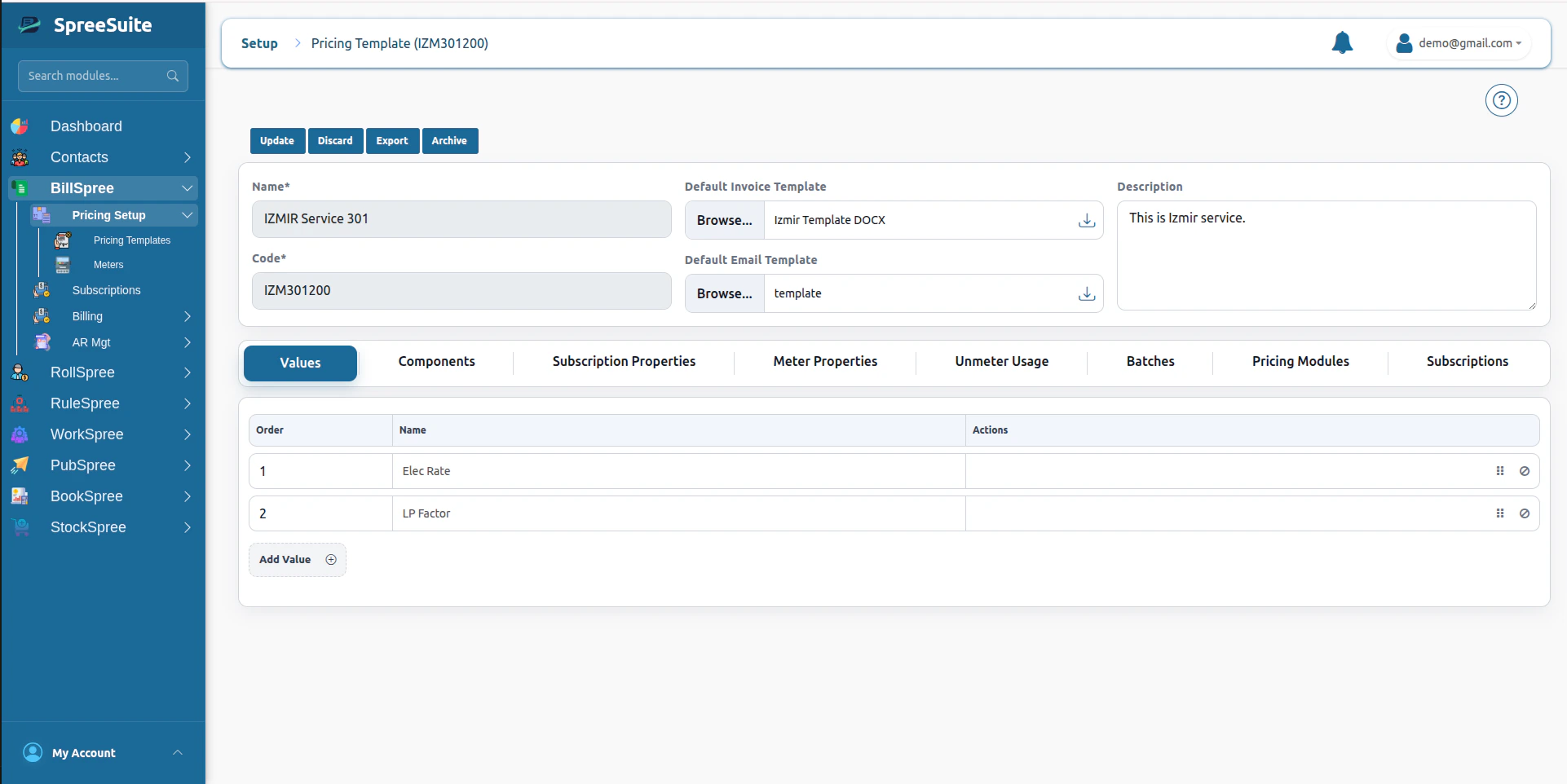 [Setup Pricing Template →](/billing/package)
From there:
1. Click on the **Plan Variants** tab.
[Setup Pricing Template →](/billing/package)
From there:
1. Click on the **Plan Variants** tab.
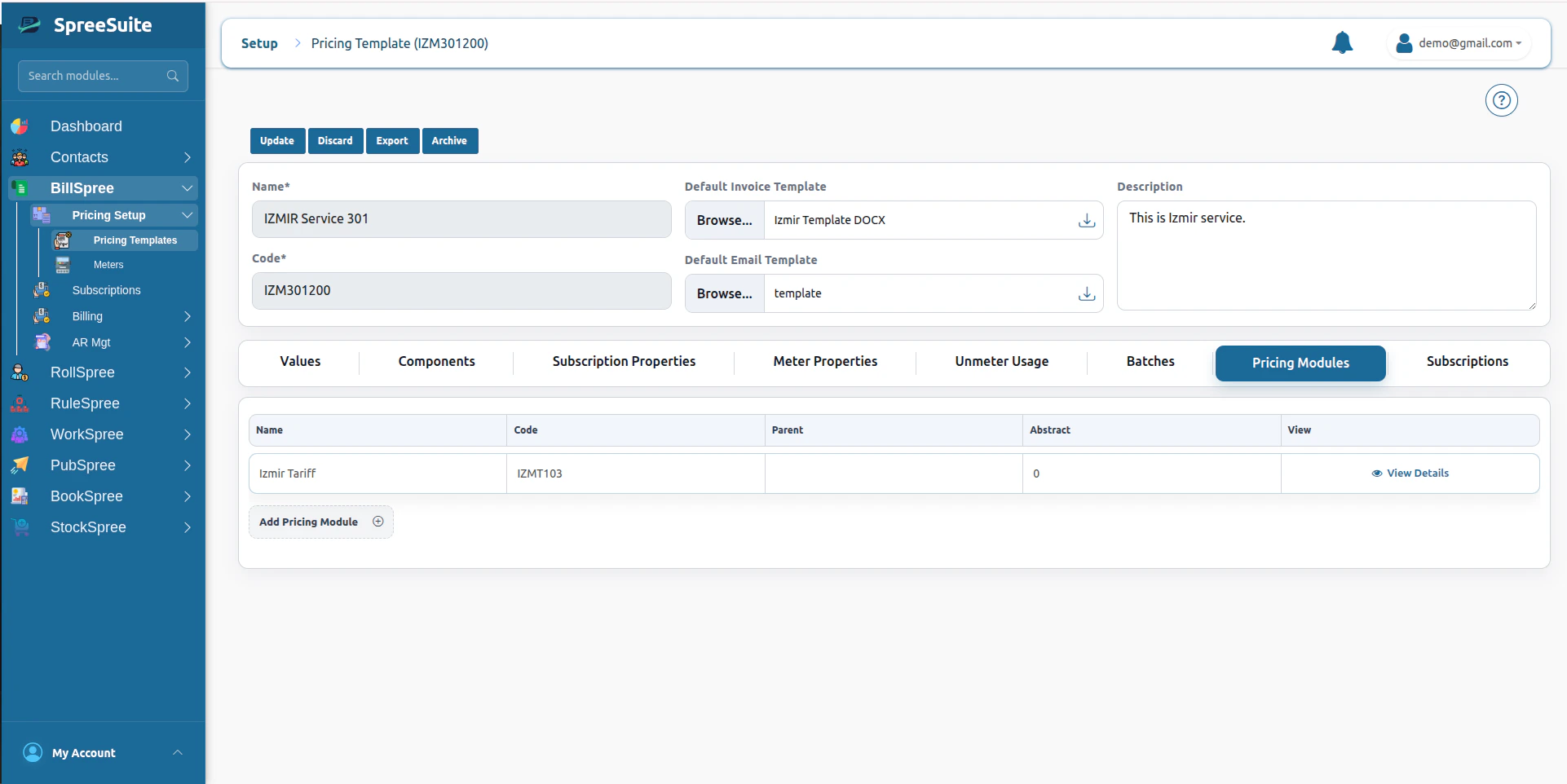 2. Click **Add Plan Variant** and set the fields covered above (Name, Code, Label, Description, Pricing Module Type, Visibility, Plan check, Custom check).
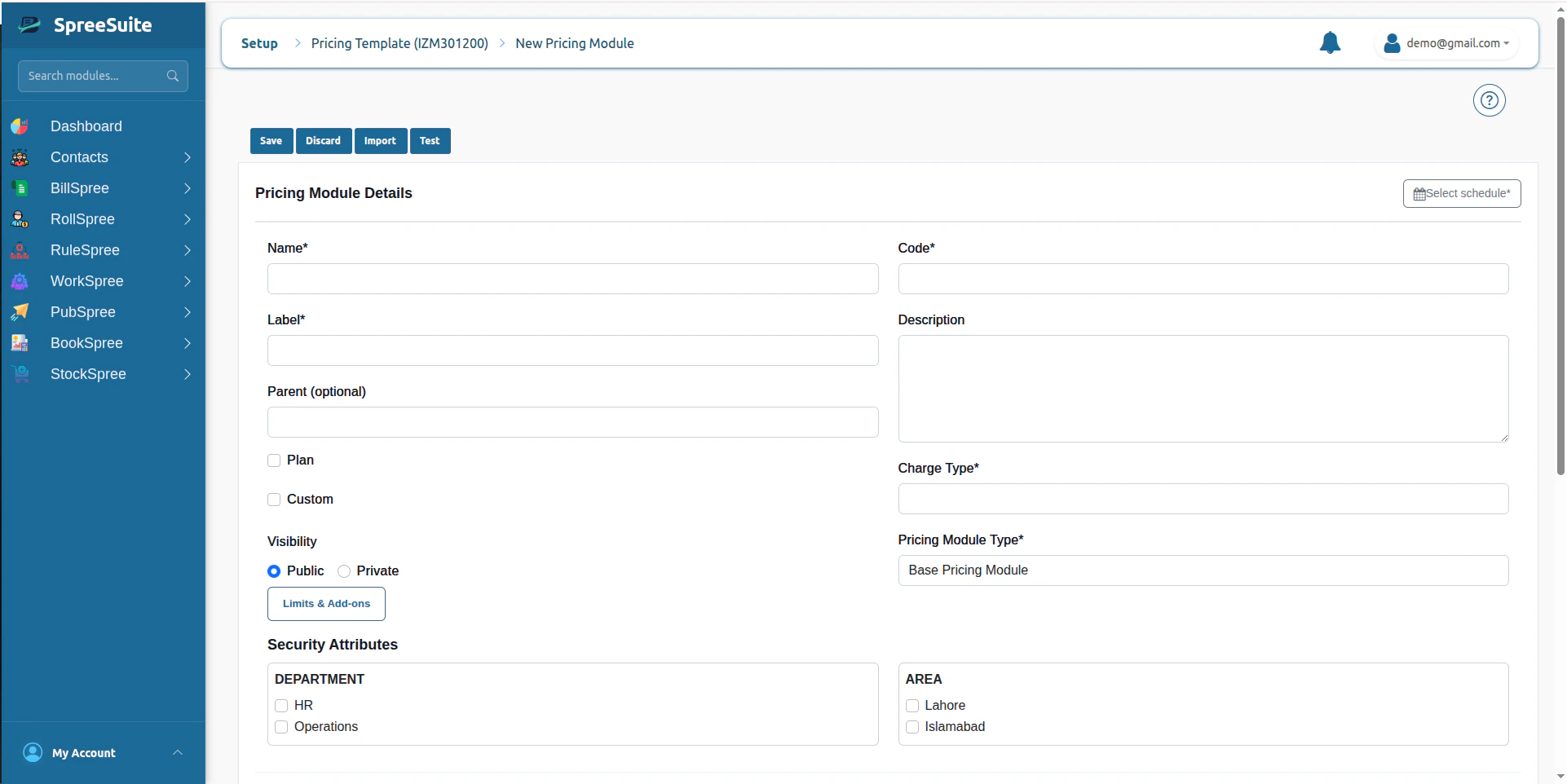 3. Assign Security Attributes if this module needs to be scoped (see [Security](#security) below).
 4. The Pricing Template's Values and Components appear here as tabs—this is the workspace where the rest of this page applies.
 ## Authoring Rules
This is the one rule-authoring mechanism used by every Pricing Module with Calculated components—Charges Rules, Base Plans, Add-On Plans, all of it. The specific module types described below are specializations of this same mechanism, not separate systems.
Like Pricing Templates, Pricing Modules don't have versioning yet (tracked as a backlog item). Until it ships, editing a rule on a Module that already has active subscribers affects all of them instantly, there's no separation between subscribers on an "old" version of the rules and subscribers on the "new" one. Everyone is rated against whatever the rule says at the time of the next bill run.
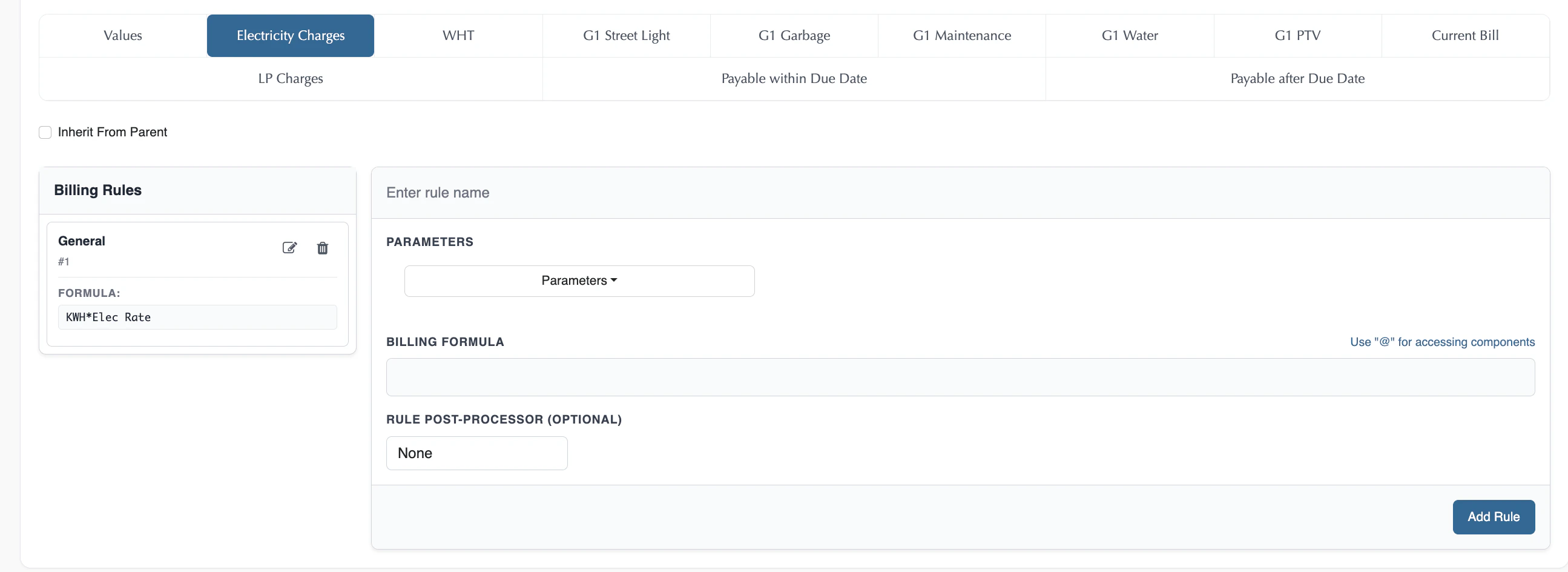
Which components you can write rules against isn't a module's choice. **Calculation Type** is decided once, on the component, back on the Pricing Template. Only components marked **Calculated** there appear as tabs in the module builder; **Manual** components never show up here at all—their values are entered later, on each draft bill, when a [bill run](/billing/bill-run-creation) is executed.
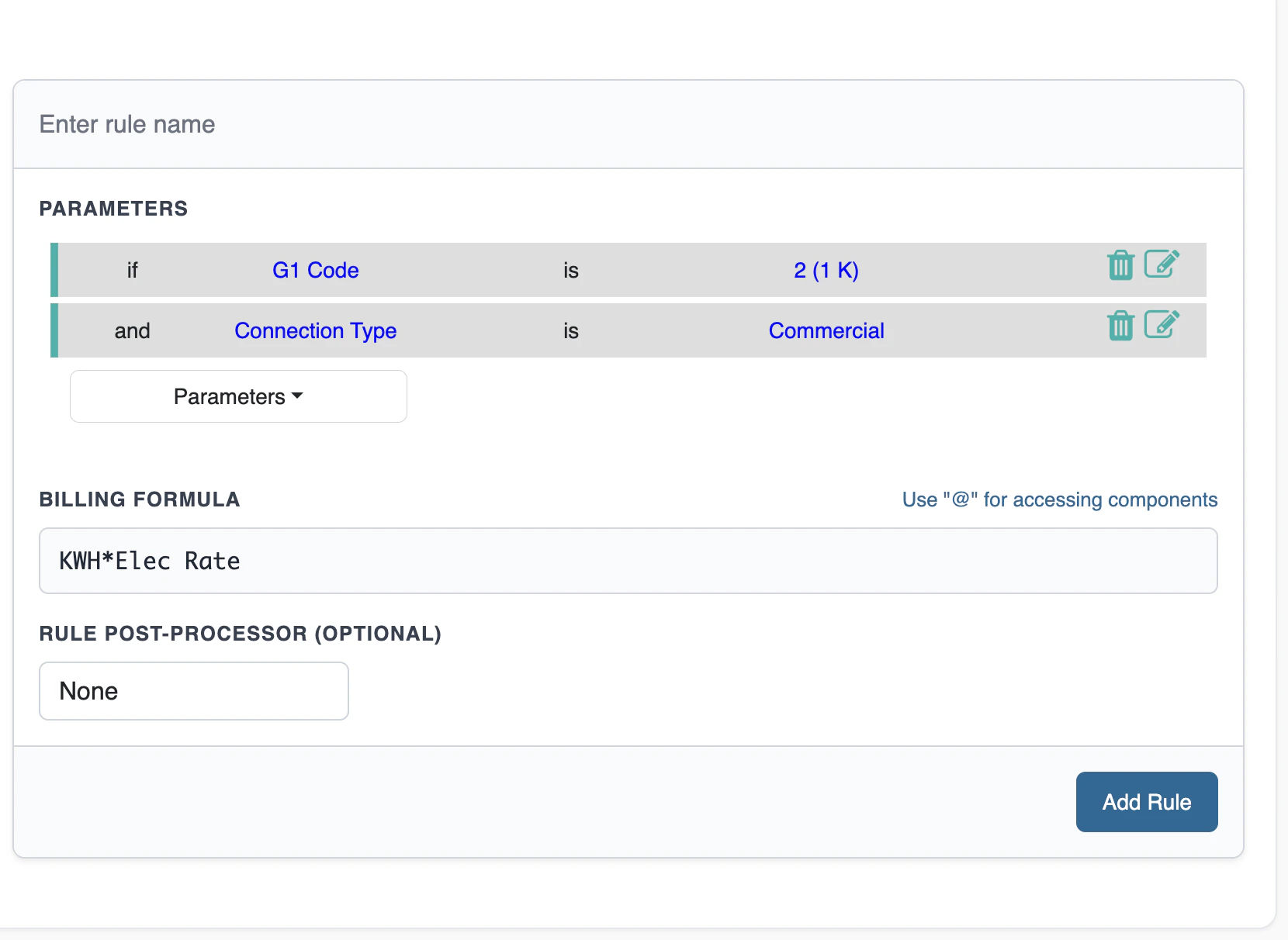
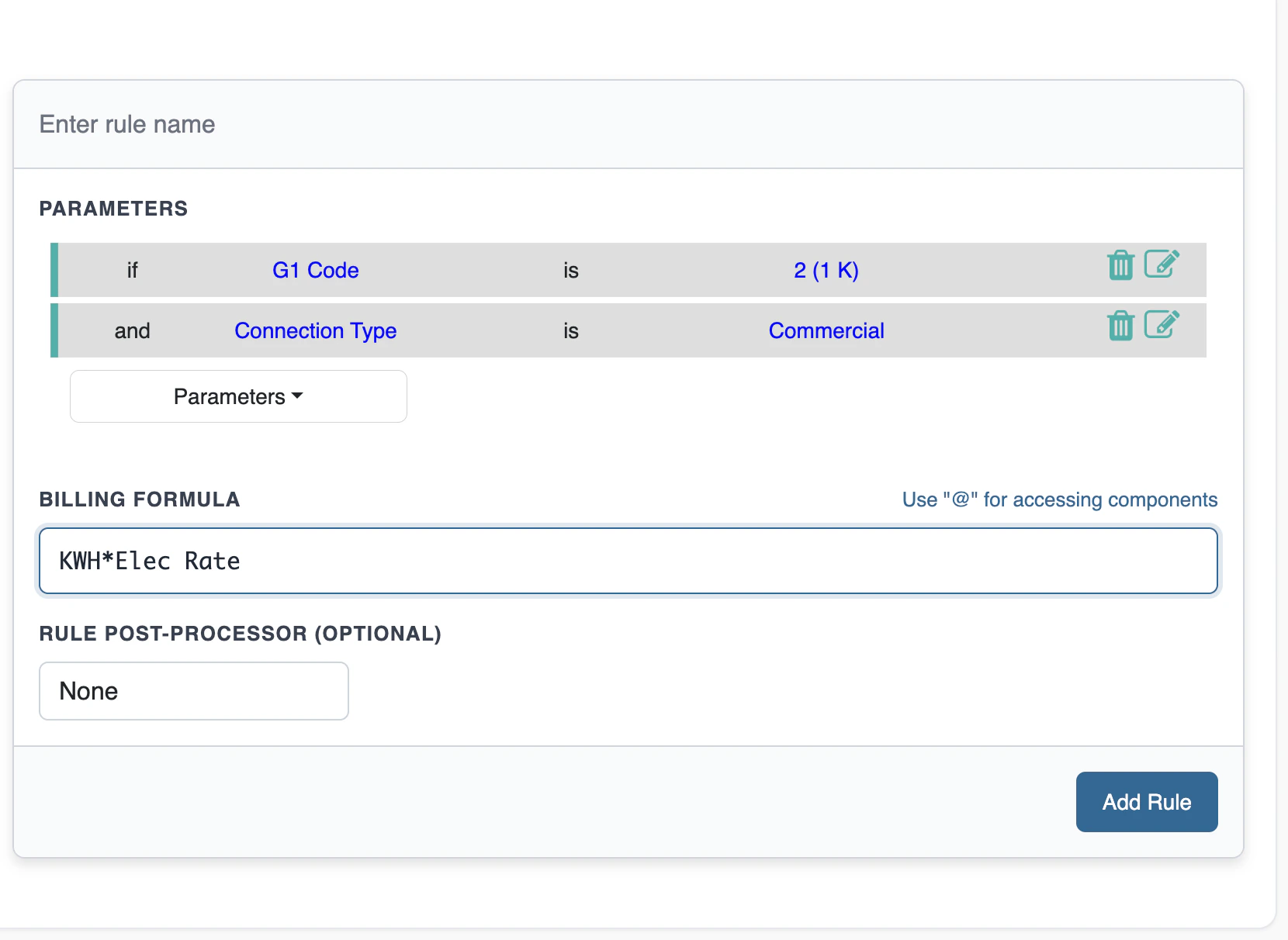
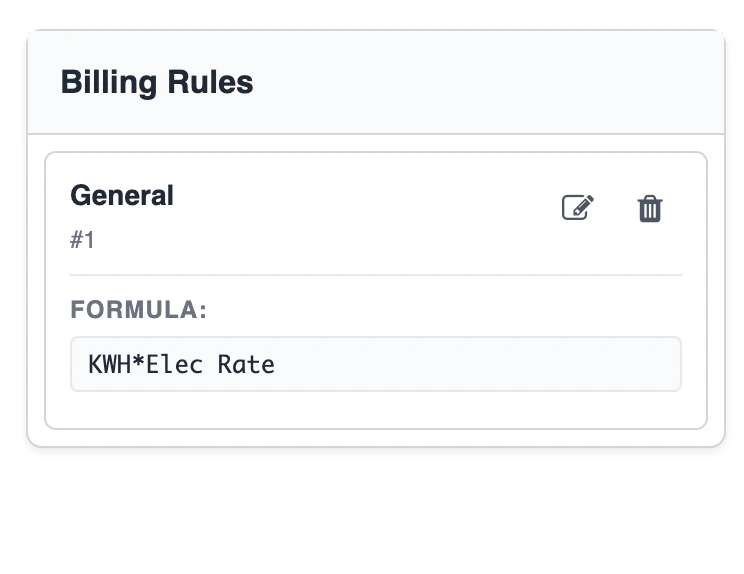
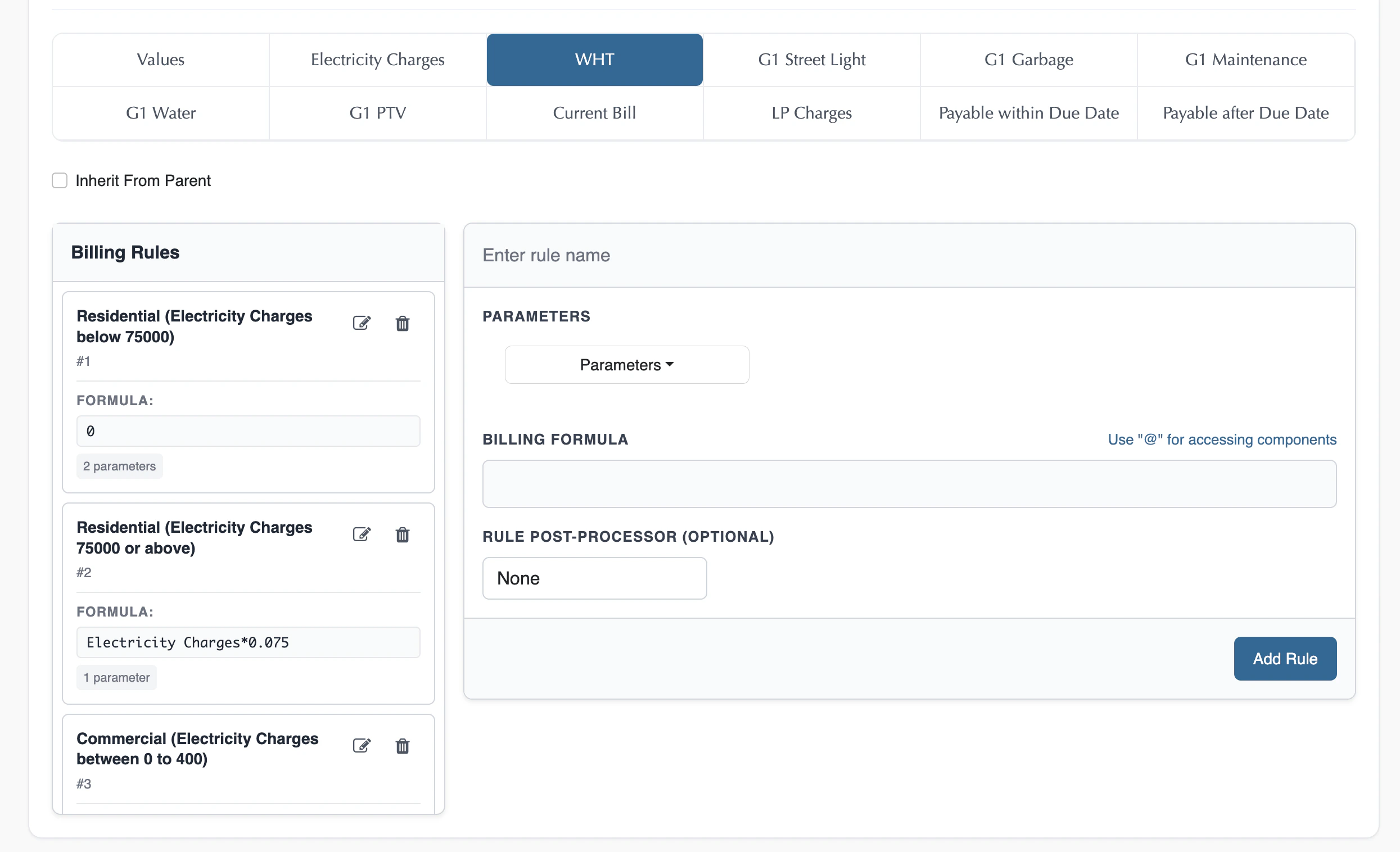
Each visible component, on its own tab, holds a sequence of **rules**. A rule has three parts: Conditions, a Billing Formula, and an optional Rule Post-Processor.
There's no completeness check on any of this. A Module, even one marked Plan and subscribed to by real customers, can have a Calculated component with zero rules defined. At bill-run time, that component simply evaluates to **0**—no error, nothing skipped, just a zero charge.
This is what makes any narrowly-scoped module possible at all, you can create a module that fills in any subset of components and leaves the rest untouched, with no requirement to complete the rest. Rate Card, Charges Rules, and Tax Module (below) are just the three familiar examples of this, not a special or exhaustive list, any other partial combination is just as valid.
### Conditions (optional)
A rule with no conditions always applies. When present, a condition can reference:
* **Subscription Properties** — List-type properties show a picker of their defined values; Number-type properties take a min and max to define the matching range. This includes the [special, automatically-generated properties](/billing/package#step-6-configure-subscription-properties-the-subscription-properties-tab) every template carries, such as Date and the per-Meter-Property estimation flag.
* **Usage** — metered or unmetered usage inputs.
* **Components** — other components' calculated values, subject to the Order constraint described under Component Chaining below.
Multiple conditions within a single rule are joined by **AND**—all of them must be true for that rule to fire.
* *Example:* `IF Subscription SLA == "Gold" AND IF Customer Region == "Europe"`
## Authoring Rules
This is the one rule-authoring mechanism used by every Pricing Module with Calculated components—Charges Rules, Base Plans, Add-On Plans, all of it. The specific module types described below are specializations of this same mechanism, not separate systems.
Like Pricing Templates, Pricing Modules don't have versioning yet (tracked as a backlog item). Until it ships, editing a rule on a Module that already has active subscribers affects all of them instantly, there's no separation between subscribers on an "old" version of the rules and subscribers on the "new" one. Everyone is rated against whatever the rule says at the time of the next bill run.
Which components you can write rules against isn't a module's choice. **Calculation Type** is decided once, on the component, back on the Pricing Template. Only components marked **Calculated** there appear as tabs in the module builder; **Manual** components never show up here at all—their values are entered later, on each draft bill, when a [bill run](/billing/bill-run-creation) is executed.
Each visible component, on its own tab, holds a sequence of **rules**. A rule has three parts: Conditions, a Billing Formula, and an optional Rule Post-Processor.
There's no completeness check on any of this. A Module, even one marked Plan and subscribed to by real customers, can have a Calculated component with zero rules defined. At bill-run time, that component simply evaluates to **0**—no error, nothing skipped, just a zero charge.
This is what makes any narrowly-scoped module possible at all, you can create a module that fills in any subset of components and leaves the rest untouched, with no requirement to complete the rest. Rate Card, Charges Rules, and Tax Module (below) are just the three familiar examples of this, not a special or exhaustive list, any other partial combination is just as valid.
### Conditions (optional)
A rule with no conditions always applies. When present, a condition can reference:
* **Subscription Properties** — List-type properties show a picker of their defined values; Number-type properties take a min and max to define the matching range. This includes the [special, automatically-generated properties](/billing/package#step-6-configure-subscription-properties-the-subscription-properties-tab) every template carries, such as Date and the per-Meter-Property estimation flag.
* **Usage** — metered or unmetered usage inputs.
* **Components** — other components' calculated values, subject to the Order constraint described under Component Chaining below.
Multiple conditions within a single rule are joined by **AND**—all of them must be true for that rule to fire.
* *Example:* `IF Subscription SLA == "Gold" AND IF Customer Region == "Europe"`
 ### Billing Formula
The formula computes the component's value once its rule's conditions are satisfied. It can reference the same set as conditions—Subscription Properties, Usage, Components—plus one special variable, **Arrear**, the outstanding arrears balance carried forward on the subledger.
* *Example:* `Base Rate * 0.90` (a 10% partner discount).
### Billing Formula
The formula computes the component's value once its rule's conditions are satisfied. It can reference the same set as conditions—Subscription Properties, Usage, Components—plus one special variable, **Arrear**, the outstanding arrears balance carried forward on the subledger.
* *Example:* `Base Rate * 0.90` (a 10% partner discount).
 ### Rule Post-Processor (optional)
A final step applied to the formula's evaluated result:
* **Ceil** — rounds the result up.
* **Floor** — rounds the result down.
* **Power** — raises the result to a power you specify.
### Multiple Rules: OR Logic, First Match Wins
A component can hold more than one rule, shown in sequence in the builder. Rules are evaluated top to bottom; the first rule whose conditions evaluate to true is applied, and later rules in the sequence are not evaluated. This is why multiple rules are described as connected by **OR**: a component's value comes from whichever single rule matches first, not from combining every matching rule.
### Component Chaining
To build progressive tax structures, surcharges, or composite discounts, a rule can reference previously calculated components as dynamic variables, in both conditions and formulas. "Previously calculated" is determined by each component's **Order**, set on the Pricing Template—a component can only reference components earlier in the Order sequence, never a later one. This guarantees every chain of calculations resolves in a single forward pass, with no circular references possible.
* *Example:* A "VAT Tax Charges" component that evaluates `(Base Charges + Electricity Consumption Charges) * 0.15`.
### Rule Post-Processor (optional)
A final step applied to the formula's evaluated result:
* **Ceil** — rounds the result up.
* **Floor** — rounds the result down.
* **Power** — raises the result to a power you specify.
### Multiple Rules: OR Logic, First Match Wins
A component can hold more than one rule, shown in sequence in the builder. Rules are evaluated top to bottom; the first rule whose conditions evaluate to true is applied, and later rules in the sequence are not evaluated. This is why multiple rules are described as connected by **OR**: a component's value comes from whichever single rule matches first, not from combining every matching rule.
### Component Chaining
To build progressive tax structures, surcharges, or composite discounts, a rule can reference previously calculated components as dynamic variables, in both conditions and formulas. "Previously calculated" is determined by each component's **Order**, set on the Pricing Template—a component can only reference components earlier in the Order sequence, never a later one. This guarantees every chain of calculations resolves in a single forward pass, with no circular references possible.
* *Example:* A "VAT Tax Charges" component that evaluates `(Base Charges + Electricity Consumption Charges) * 0.15`.

 ## Test Plan
Runs a module with sample inputs and shows each component's result, before it's used in live billing.
1. Open the **Plan** screen for the module you want to check.
## Test Plan
Runs a module with sample inputs and shows each component's result, before it's used in live billing.
1. Open the **Plan** screen for the module you want to check.
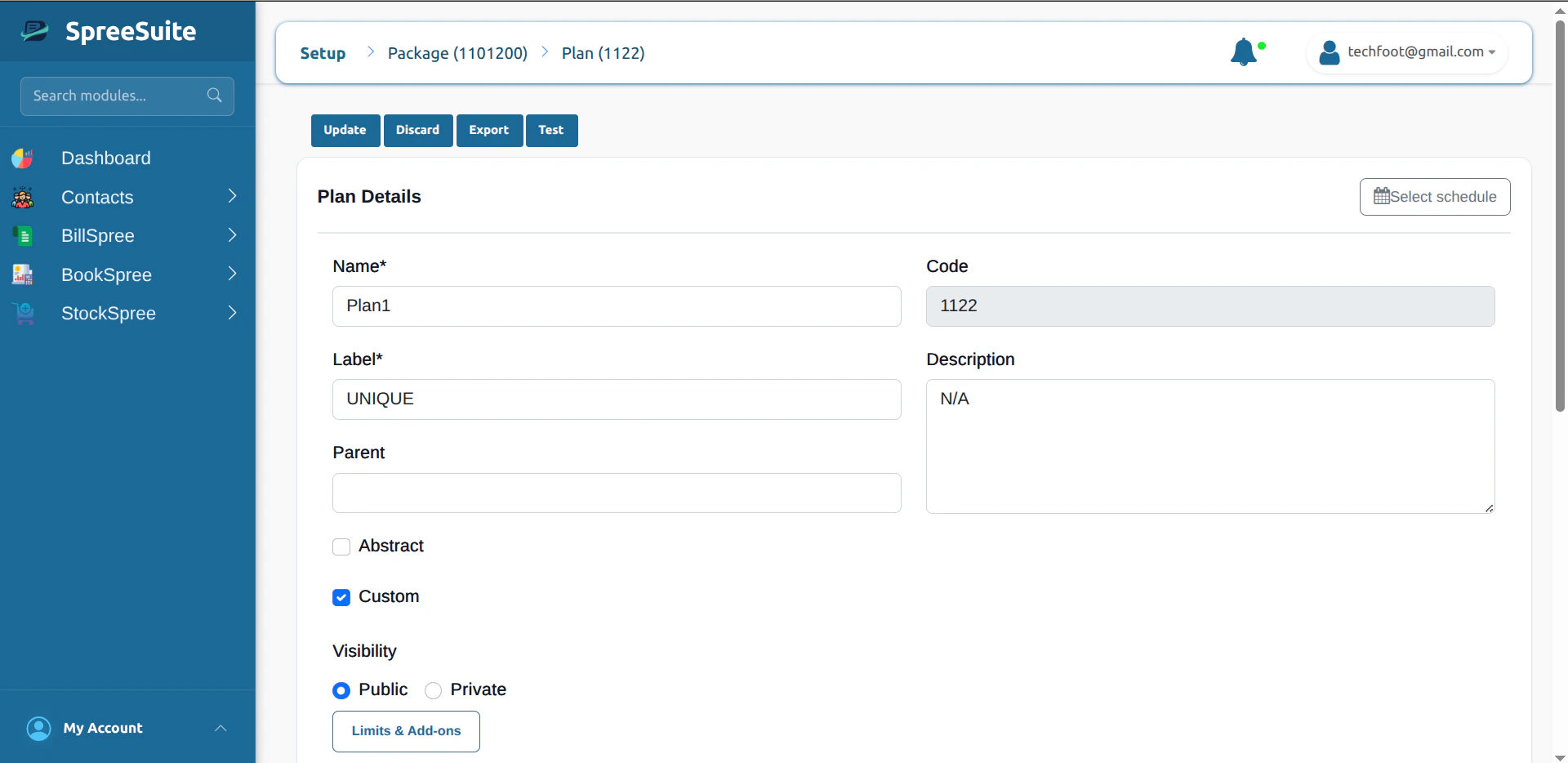 2. Click **Test** in the header (alongside **Update**, **Discard**, and **Export**).
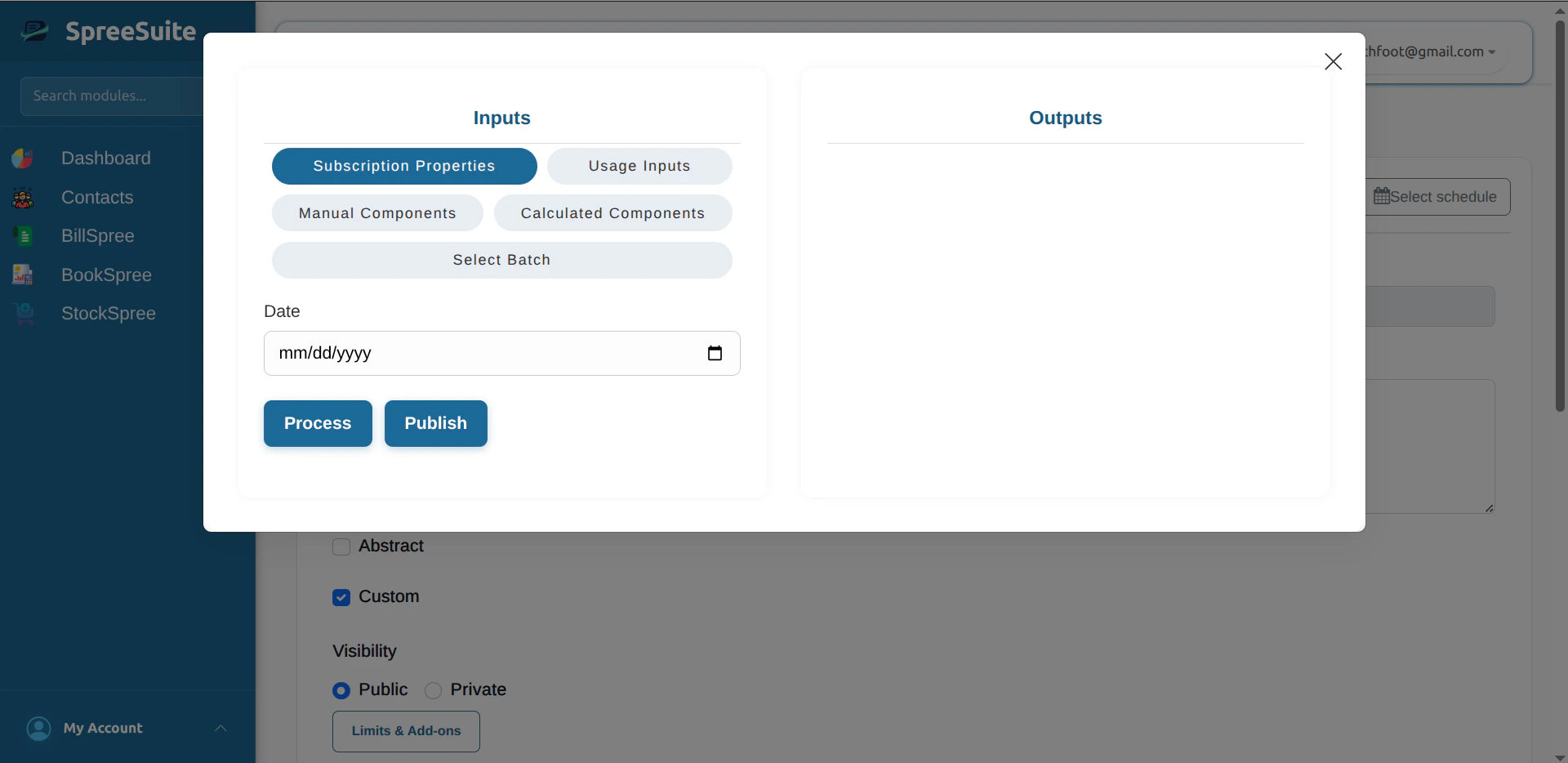 3. Enter sample values for the **Date**, **Components**, and **Usage** inputs (and anything else the template defines).
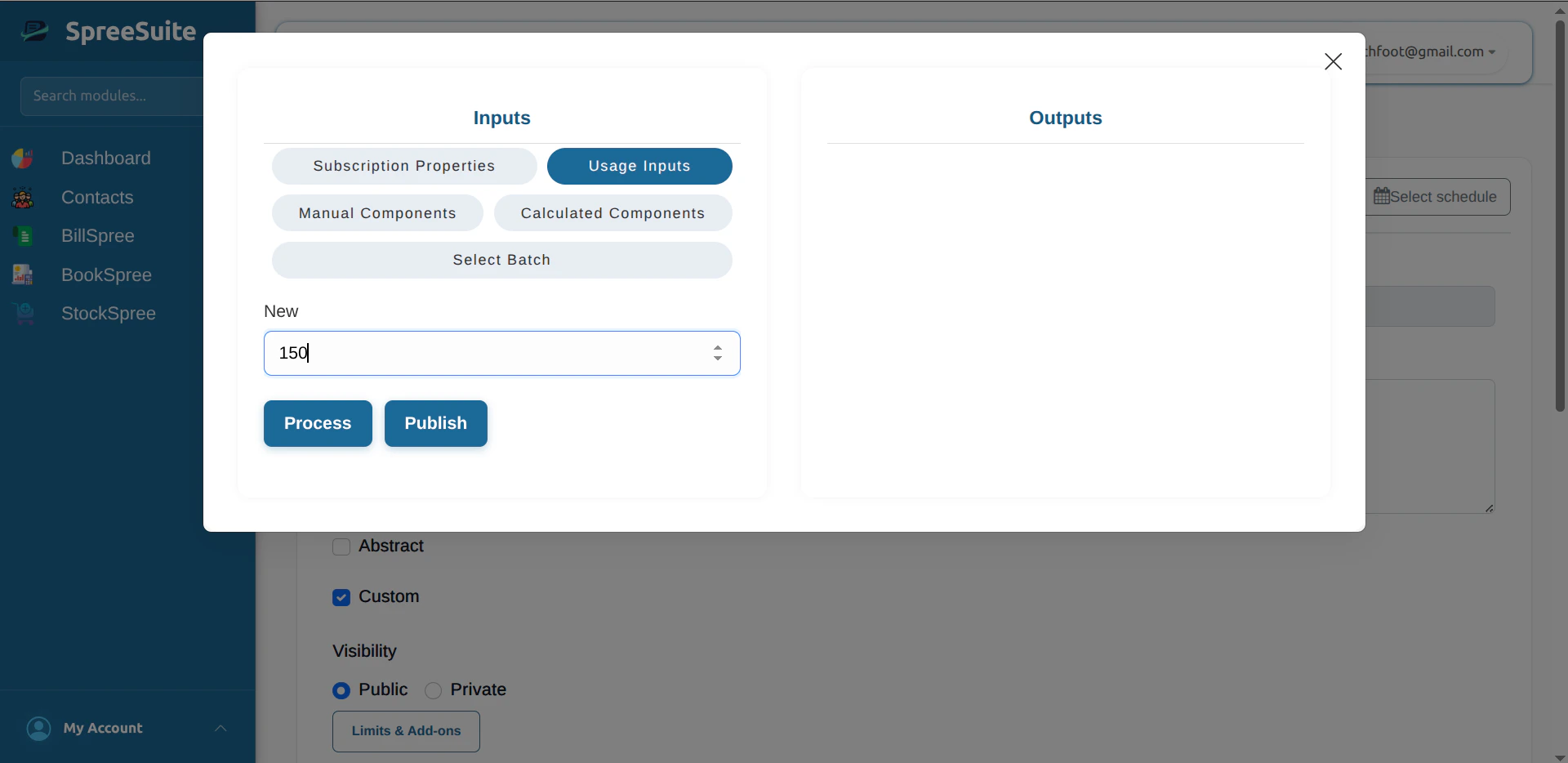 4. Click **Process** to calculate the bill for those inputs.
5. Read the **Outputs**: each component shown with the amount its conditions and formula produced.
4. Click **Process** to calculate the bill for those inputs.
5. Read the **Outputs**: each component shown with the amount its conditions and formula produced.
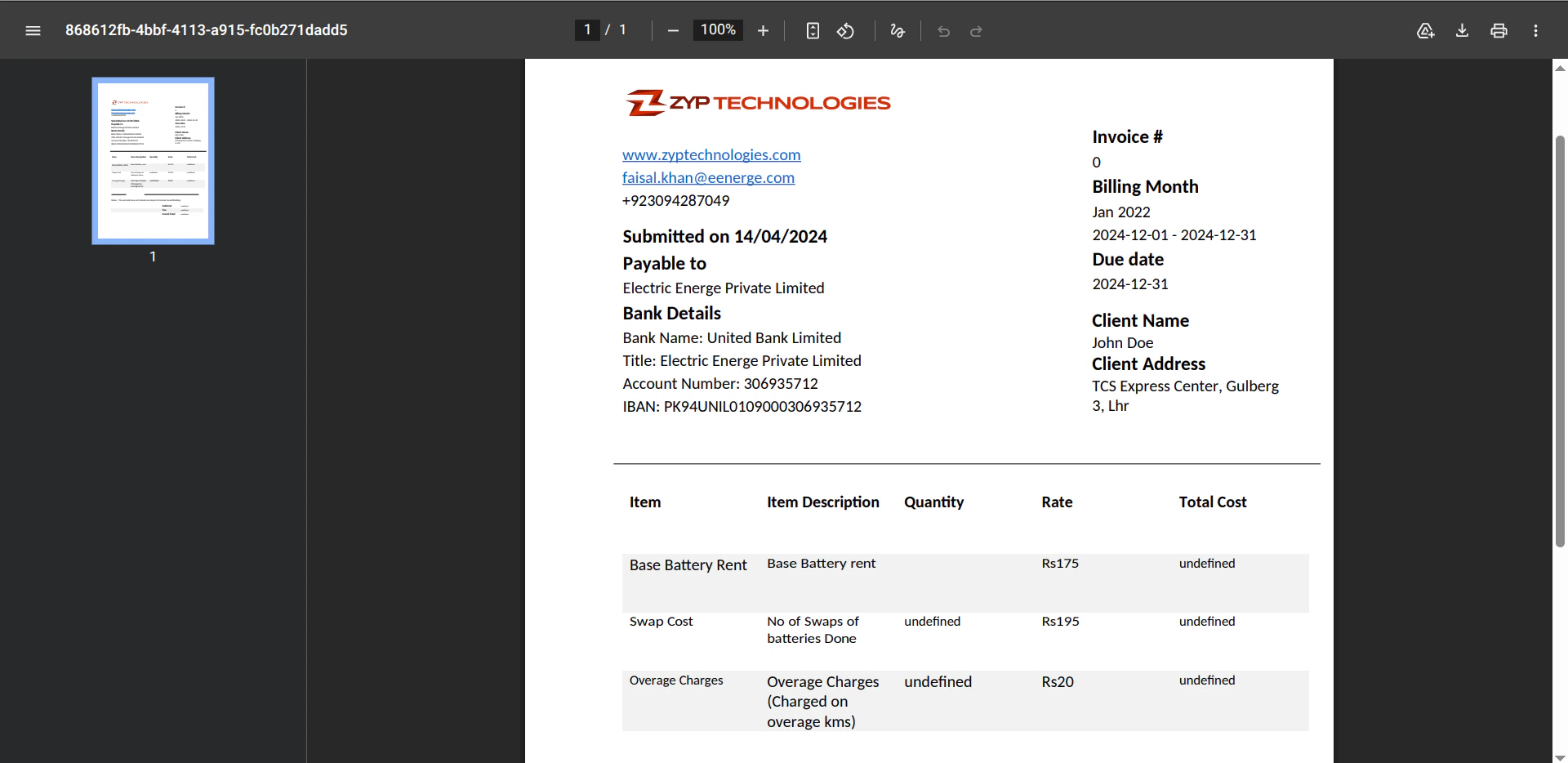
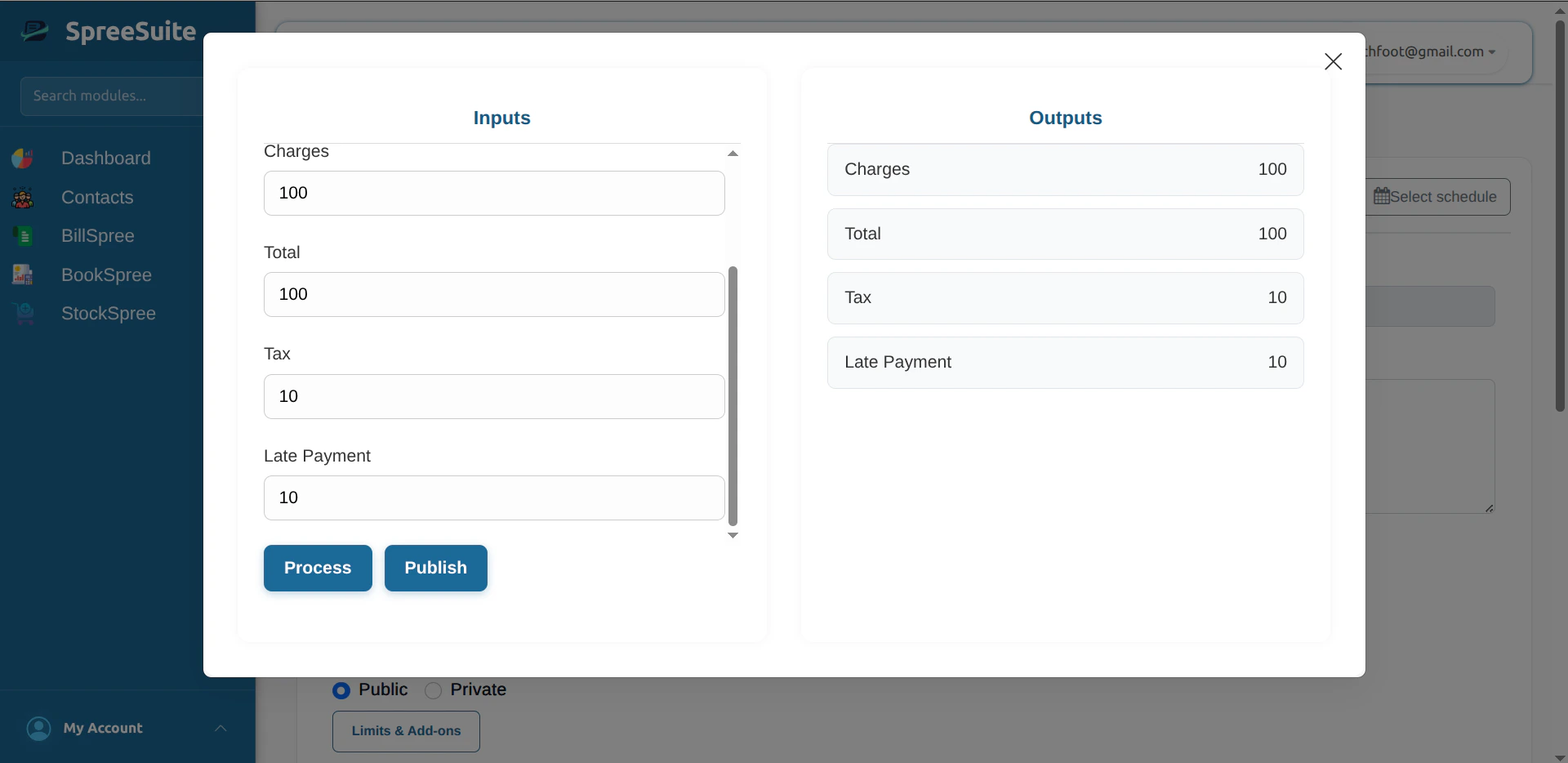 6. Click **Publish** for a PDF of that test run, using the bill template from the Pricing Template. If none is attached, fix that on the template first.
 Run Test Plan again after changing any Value, condition, or formula to confirm totals are still correct—remember, versioning isn't built yet, so a live module's existing subscribers are affected by the same edits you're testing here.
## Prepaid and Postpaid
**Billing Timing** is a direct field on the module, required when Plan is marked. Two values:
**Prepaid** — pay first, then use. Subscribe, pay, then use the service. When the balance runs low or out, subscribe again. Pay → use.
**Postpaid** — use first, pay later. Use the service through the period, get billed at the end for what was used, pay by the due date. Use → bill → pay.
## Billing Configuration
A separate entity from the module itself—created independently, then attached to it. Required when Plan is marked. Like Rate Cards and Charges Rules, it's reusable: the same Billing Configuration can be attached to multiple Plans rather than creating one fresh per Plan. See [Billing Configuration](/billing/billing-configuration) for the full model—bill-run timing, dunning, and late payment.
## Tracking Usage
Two ways usage gets recorded against a subscription:
**During subscription creation** — the amount is deducted and an invoice is generated and sent immediately.
**Via API** — usage can be recorded programmatically at any time. The system stores recorded usage events and accumulates them for the next billing cycle.
## Building Blocks: Modeling Patterns
Within a single Pricing Template, these aren't enforced types, they're patterns you can model using the fields already covered above. Each one covers only part of the component canvas:
### Rate Card
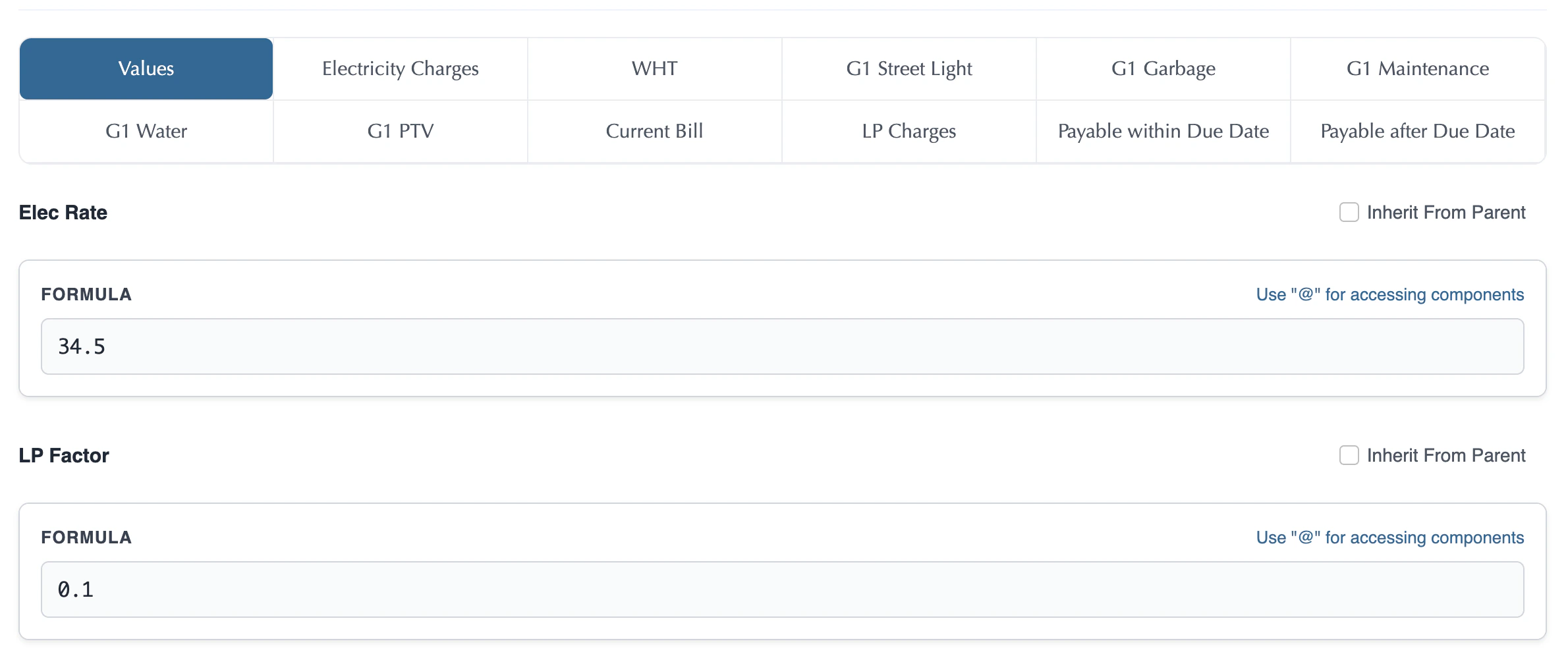
To model one: set **Visibility** to Private and leave **Plan** unmarked, so it's never shown on the portal and never subscribable, and fill in values for the template's **rate components only**, leaving charge components untouched. It stays reusable across multiple plans without ever being subscribed to directly.
*Example: Rate Card 1 sets the per-kWh residential rate. Rate Card 2 sets the commercial rate. Same template, same charge logic — different rate cards.*
In the module builder, this is the **Values** tab: every Value defined on the template appears with a plain input field next to it, where you enter the actual constant for that placeholder.
Run Test Plan again after changing any Value, condition, or formula to confirm totals are still correct—remember, versioning isn't built yet, so a live module's existing subscribers are affected by the same edits you're testing here.
## Prepaid and Postpaid
**Billing Timing** is a direct field on the module, required when Plan is marked. Two values:
**Prepaid** — pay first, then use. Subscribe, pay, then use the service. When the balance runs low or out, subscribe again. Pay → use.
**Postpaid** — use first, pay later. Use the service through the period, get billed at the end for what was used, pay by the due date. Use → bill → pay.
## Billing Configuration
A separate entity from the module itself—created independently, then attached to it. Required when Plan is marked. Like Rate Cards and Charges Rules, it's reusable: the same Billing Configuration can be attached to multiple Plans rather than creating one fresh per Plan. See [Billing Configuration](/billing/billing-configuration) for the full model—bill-run timing, dunning, and late payment.
## Tracking Usage
Two ways usage gets recorded against a subscription:
**During subscription creation** — the amount is deducted and an invoice is generated and sent immediately.
**Via API** — usage can be recorded programmatically at any time. The system stores recorded usage events and accumulates them for the next billing cycle.
## Building Blocks: Modeling Patterns
Within a single Pricing Template, these aren't enforced types, they're patterns you can model using the fields already covered above. Each one covers only part of the component canvas:
### Rate Card
To model one: set **Visibility** to Private and leave **Plan** unmarked, so it's never shown on the portal and never subscribable, and fill in values for the template's **rate components only**, leaving charge components untouched. It stays reusable across multiple plans without ever being subscribed to directly.
*Example: Rate Card 1 sets the per-kWh residential rate. Rate Card 2 sets the commercial rate. Same template, same charge logic — different rate cards.*
In the module builder, this is the **Values** tab: every Value defined on the template appears with a plain input field next to it, where you enter the actual constant for that placeholder.
 ### Charges Rules
To model one: same setup (Visibility Private, Plan unmarked), but author rules for the template's **charge components only** — surcharges, discounts, late fees, manual adjustments — leaving rate components untouched.
Because it's decoupled from rate cards, the same set of charge rules can be shared across plans that have entirely different pricing tiers.
### Tax Module
The same Charges Rules pattern, narrowed to **tax components only**. Isolating tax logic into its own non-Plan module makes it easy to update tax rules without touching rate logic or other charge rules.
## Composing Plans from Building Blocks
The underlying mechanism is **per-component inheritance**: for any component, instead of authoring its rules natively in this module, you can point that component at another module's same component and inherit its rules wholesale. This is a live reference, not a one-time copy—editing the source module's rules later updates every module that inherits from it automatically. This only works between modules built on the **same Pricing Template**, since a component's identity is scoped to the template that defines it.
This choice is made independently per component. You can inherit every component from other modules, author every component natively, or mix the two freely, inheriting some components while authoring others directly, in any combination.
### Composite Plan
The common name for a module composed mostly or entirely through inheritance rather than native authoring. The typical pattern: inherit all rate components from a Rate Card, all charge components from a Charges Rules module, and tax components from a Tax Module:
```
Composite Plan 1 = Rate Card 1 + Charges Rules + Tax Module
Composite Plan 2 = Rate Card 2 + Charges Rules + Tax Module
```
Both plans share the same charge logic and tax rules. Only the rates differ. Updating the shared Charges Rules module updates both plans automatically — no duplication. Nothing stops a narrower mix either, inheriting just one specific charge component from another module while authoring the rest natively.
### Unified Base Plan
The other end of the spectrum: a plan that authors both rate components *and* charge components natively, with no inheritance at all. Best when a plan's pricing is entirely self-contained.
## The Composition Pattern
```mermaid theme={null}
graph TD
Template["Pricing Template\n(rate + charge components)"]
RC1["Rate Card 1\n(rate components only)"]
RC2["Rate Card 2\n(rate components only)"]
CS["Charges Rules\n(charge components only)"]
TM["Tax Module\n(tax components only)"]
CP1["Composite Plan 1\nRC1 + CS + TM"]
CP2["Composite Plan 2\nRC2 + CS + TM"]
UBP["Unified Base Plan\n(rates + charges in one)"]
Template --> RC1
Template --> RC2
Template --> CS
Template --> TM
RC1 --> CP1
CS --> CP1
TM --> CP1
RC2 --> CP2
CS --> CP2
TM --> CP2
Template --> UBP
style Template fill:#f0f4ff,stroke:#0975a4,stroke-width:2px
style RC1 fill:#fff,stroke:#333,stroke-width:1px
style RC2 fill:#fff,stroke:#333,stroke-width:1px
style CS fill:#fff,stroke:#333,stroke-width:1px
style TM fill:#fff,stroke:#333,stroke-width:1px
style CP1 fill:#e8f5e9,stroke:#2e7d32,stroke-width:1px
style CP2 fill:#e8f5e9,stroke:#2e7d32,stroke-width:1px
style UBP fill:#e8f5e9,stroke:#2e7d32,stroke-width:1px
```
One template. Multiple rate cards. Shared charge logic. Plans composed independently.
## Why This Matters
**One change, many plans.** The Charges Rules and Tax Module are shared across every Composite Plan that inherits from them. Update a tax rate once — every plan reprices automatically. No hunting across configurations.
**Rate flexibility without logic duplication.** You can have ten rate cards — residential, commercial, peak, off-peak, regional variants — all composing with the same charge and tax logic. That's ten plans from three building blocks.
**Surgical updates.** A tax law changes? Update the Tax Module. A surcharge is removed? Update the Charges Rules. A rate is renegotiated for a customer segment? Swap the Rate Card. Nothing else moves.
**Audit clarity.** Because logic is isolated by purpose — rates here, charges there, tax in its own module — you can trace exactly which module produced which line item on any bill.
**Scale without duplication.** The alternative — defining rates, charges, and tax rules independently inside each plan — means N plans × M rule types of duplicated logic. That's how billing systems become unmaintainable. Composition keeps the structure flat regardless of how many plans you add.
***
## Security
Pricing Modules (Rate Cards, Charges Rules, Plans, Add-Ons) can be scoped with **Security Attributes**, using the platform's Attribute-Based Access Control (ABAC) framework. See [Security Attributes](/security-attributes) for the full model.
### Charges Rules
To model one: same setup (Visibility Private, Plan unmarked), but author rules for the template's **charge components only** — surcharges, discounts, late fees, manual adjustments — leaving rate components untouched.
Because it's decoupled from rate cards, the same set of charge rules can be shared across plans that have entirely different pricing tiers.
### Tax Module
The same Charges Rules pattern, narrowed to **tax components only**. Isolating tax logic into its own non-Plan module makes it easy to update tax rules without touching rate logic or other charge rules.
## Composing Plans from Building Blocks
The underlying mechanism is **per-component inheritance**: for any component, instead of authoring its rules natively in this module, you can point that component at another module's same component and inherit its rules wholesale. This is a live reference, not a one-time copy—editing the source module's rules later updates every module that inherits from it automatically. This only works between modules built on the **same Pricing Template**, since a component's identity is scoped to the template that defines it.
This choice is made independently per component. You can inherit every component from other modules, author every component natively, or mix the two freely, inheriting some components while authoring others directly, in any combination.
### Composite Plan
The common name for a module composed mostly or entirely through inheritance rather than native authoring. The typical pattern: inherit all rate components from a Rate Card, all charge components from a Charges Rules module, and tax components from a Tax Module:
```
Composite Plan 1 = Rate Card 1 + Charges Rules + Tax Module
Composite Plan 2 = Rate Card 2 + Charges Rules + Tax Module
```
Both plans share the same charge logic and tax rules. Only the rates differ. Updating the shared Charges Rules module updates both plans automatically — no duplication. Nothing stops a narrower mix either, inheriting just one specific charge component from another module while authoring the rest natively.
### Unified Base Plan
The other end of the spectrum: a plan that authors both rate components *and* charge components natively, with no inheritance at all. Best when a plan's pricing is entirely self-contained.
## The Composition Pattern
```mermaid theme={null}
graph TD
Template["Pricing Template\n(rate + charge components)"]
RC1["Rate Card 1\n(rate components only)"]
RC2["Rate Card 2\n(rate components only)"]
CS["Charges Rules\n(charge components only)"]
TM["Tax Module\n(tax components only)"]
CP1["Composite Plan 1\nRC1 + CS + TM"]
CP2["Composite Plan 2\nRC2 + CS + TM"]
UBP["Unified Base Plan\n(rates + charges in one)"]
Template --> RC1
Template --> RC2
Template --> CS
Template --> TM
RC1 --> CP1
CS --> CP1
TM --> CP1
RC2 --> CP2
CS --> CP2
TM --> CP2
Template --> UBP
style Template fill:#f0f4ff,stroke:#0975a4,stroke-width:2px
style RC1 fill:#fff,stroke:#333,stroke-width:1px
style RC2 fill:#fff,stroke:#333,stroke-width:1px
style CS fill:#fff,stroke:#333,stroke-width:1px
style TM fill:#fff,stroke:#333,stroke-width:1px
style CP1 fill:#e8f5e9,stroke:#2e7d32,stroke-width:1px
style CP2 fill:#e8f5e9,stroke:#2e7d32,stroke-width:1px
style UBP fill:#e8f5e9,stroke:#2e7d32,stroke-width:1px
```
One template. Multiple rate cards. Shared charge logic. Plans composed independently.
## Why This Matters
**One change, many plans.** The Charges Rules and Tax Module are shared across every Composite Plan that inherits from them. Update a tax rate once — every plan reprices automatically. No hunting across configurations.
**Rate flexibility without logic duplication.** You can have ten rate cards — residential, commercial, peak, off-peak, regional variants — all composing with the same charge and tax logic. That's ten plans from three building blocks.
**Surgical updates.** A tax law changes? Update the Tax Module. A surcharge is removed? Update the Charges Rules. A rate is renegotiated for a customer segment? Swap the Rate Card. Nothing else moves.
**Audit clarity.** Because logic is isolated by purpose — rates here, charges there, tax in its own module — you can trace exactly which module produced which line item on any bill.
**Scale without duplication.** The alternative — defining rates, charges, and tax rules independently inside each plan — means N plans × M rule types of duplicated logic. That's how billing systems become unmaintainable. Composition keeps the structure flat regardless of how many plans you add.
***
## Security
Pricing Modules (Rate Cards, Charges Rules, Plans, Add-Ons) can be scoped with **Security Attributes**, using the platform's Attribute-Based Access Control (ABAC) framework. See [Security Attributes](/security-attributes) for the full model.