> ## Documentation Index
> Fetch the complete documentation index at: https://docs.techfootintl.com/llms.txt
> Use this file to discover all available pages before exploring further.
# Post Bills
## Overview
Post Bills is the stage where processed billing data is converted into final, official bills.
At this point, all calculations have already been completed during bill processing. Posting is the step that finalizes these results and makes them financially official within the system.
In simple terms:
> Post Bills is the “locking and finalization” step where calculated bills become official records.
Once posted, bills are considered complete and ready for downstream actions such as publishing, distribution, and accounting reconciliation.
# Why Posting Bills Is Important
Bill processing produces calculated results, but those results are still editable and not yet finalized.
Posting ensures that:
* Billing values are locked
* Financial records are finalized
* Accounting entries are generated
* No further changes occur without adjustments
* Bills become system-of-record entries
Without posting, bills remain in a draft or intermediate state.
# What Happens During Post Bills
During posting, the system takes processed billing records and performs finalization steps to make them official.
This includes:
* Locking calculated values
* Creating final bill records
* Generating accounting journal entries
* Validating completeness of billing data
* Marking bills as posted
# Core Activities
## 1. Finalize Bill Calculations
The system verifies that all billing computations are complete and consistent.
This includes:
* Service charges
* Usage calculations
* Taxes
* Discounts
* Manual components
* Adjustments
No recalculation is performed at this stage—only validation and confirmation.
## 2. Generate Accounting Entries
Once finalized, the system creates accounting entries to reflect financial impact.
### Examples:
* Revenue recognition entries
* Receivable entries
* Tax liabilities
* Adjustment postings
These entries ensure that billing data is synchronized with financial systems.
## 3. Lock Calculated Values
All bill values are locked to prevent further modification.
Once locked:
* Charges cannot be changed
* Usage cannot be updated
* Pricing rules cannot be re-applied
Any corrections must be handled through adjustments.
## 4. Create Official Bill Records
The system creates final bill records that become the official source of truth.
These records include:
* Final amount
* Breakdown of charges
* Tax details
* Customer and service information
* Term association
# Posting Workflow
The posting process follows a controlled sequence:
```mermaid theme={null}
graph TD
%% Define Nodes
A["Processed Bills Ready"]
B["Validate Billing Completeness"]
C["Finalize Calculations"]
D["Generate Accounting Entries"]
E["Lock Bill Records"]
F["Create Official Bills"]
G["Mark Status as POSTED"]
%% Define Connections
A --> B
B --> C
C --> D
D --> E
E --> F
F --> G
%% Styling for a clean, professional look
style A fill:#fff,stroke:#333,stroke-width:1px
style B fill:#fff,stroke:#333,stroke-width:1px
style C fill:#fff,stroke:#333,stroke-width:1px
style D fill:#fff,stroke:#333,stroke-width:1px
style E fill:#fff,stroke:#333,stroke-width:1px
style F fill:#fff,stroke:#333,stroke-width:1px
style G fill:#fff,stroke:#333,stroke-width:1px
```
# Example Scenario
## Before Posting (Processed Bill)
| Component | Amount |
| :------------------ | :----- |
| Electricity Charges | \$300 |
| Water Charges | \$80 |
| Manual Fee | \$10 |
| Tax | \$39 |
| Total | \$429 |
At this stage, values are still in processed state and can be adjusted.
## After Posting (Final Bill)
| Component | Amount |
| :------------------ | :----- |
| Electricity Charges | \$300 |
| Water Charges | \$80 |
| Manual Fee | \$10 |
| Tax | \$39 |
| Total | \$429 |
After posting:
* Values are locked
* Bill becomes official
* Accounting entries are created
# Bill Status Lifecycle
After posting, bill status typically becomes:
```text theme={null}
DRAFT → PROCESSED → POSTED
```
Once a bill is POSTED:
* It becomes a permanent financial record
* It is eligible for publishing
* It can be distributed to customers
### How to Post Bills
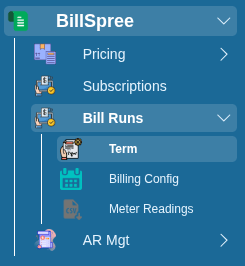
1-Go to **BillSpree** **→Bill Runs →Term**
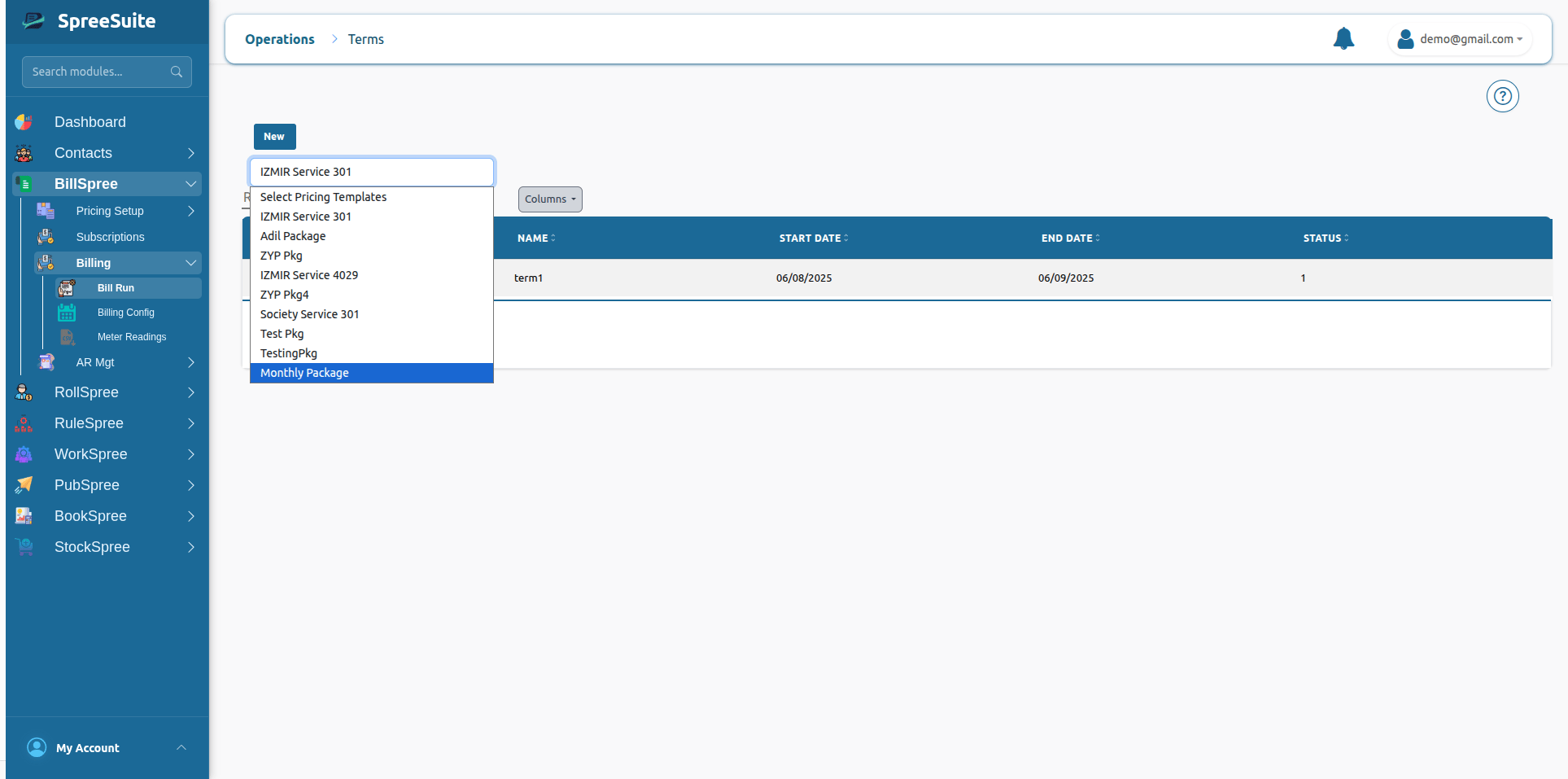
 2-Select **Pricing template** of Term:
 # Unmetered Services
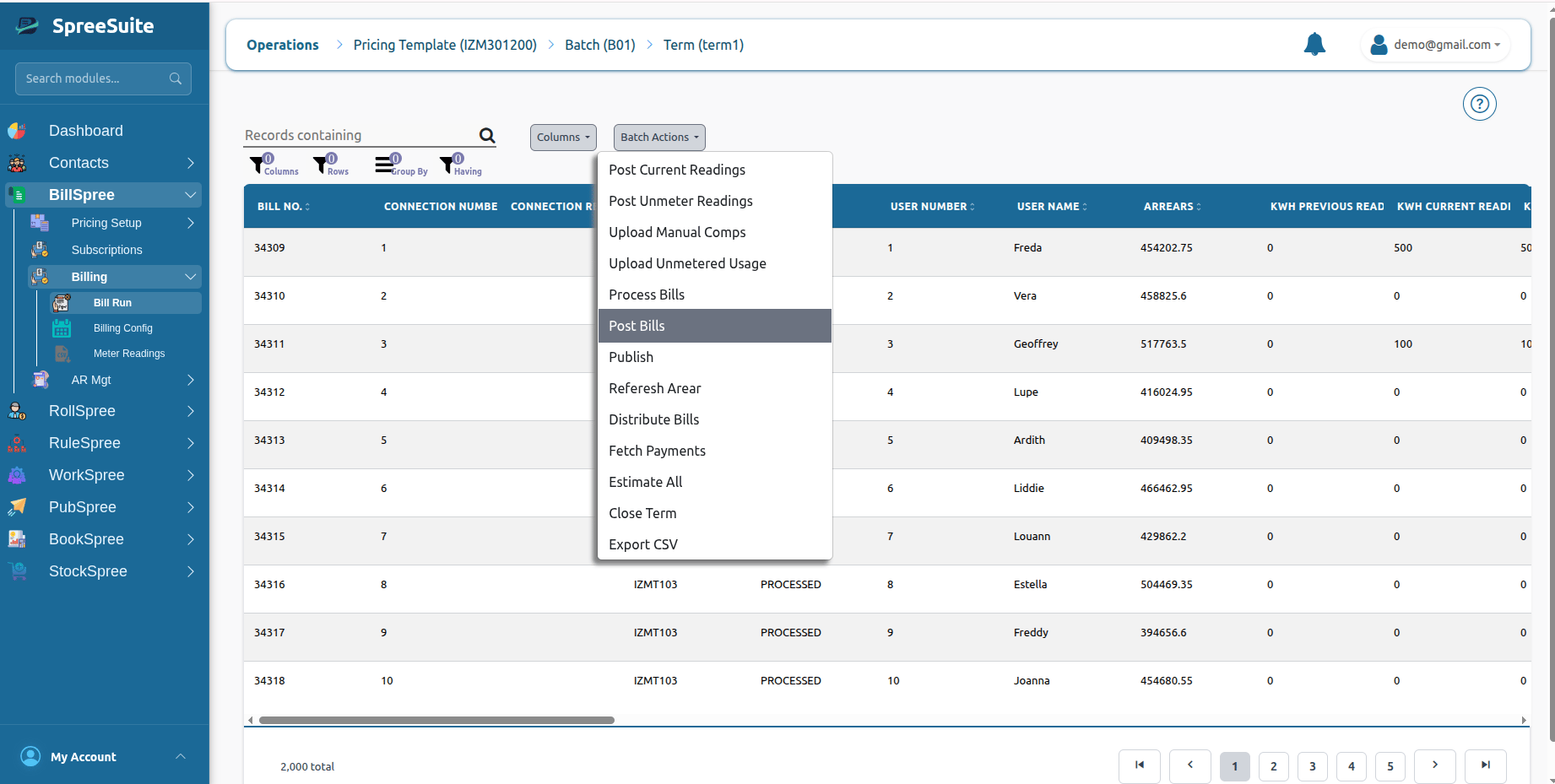
3-Click on **Batch Action** and Select **Post Bills.**
# Unmetered Services
3-Click on **Batch Action** and Select **Post Bills.**
 # Summary
Post Bills finalizes processed billing data into official, locked financial records and generates accounting entries, making bills ready for publishing and customer distribution.
# Summary
Post Bills finalizes processed billing data into official, locked financial records and generates accounting entries, making bills ready for publishing and customer distribution.